TikTok Private Account: Rules, Setup & Limits
Learn how a TikTok private account works, what stays visible to strangers, how to change settings, and why third-party tools cannot unlock private videos.
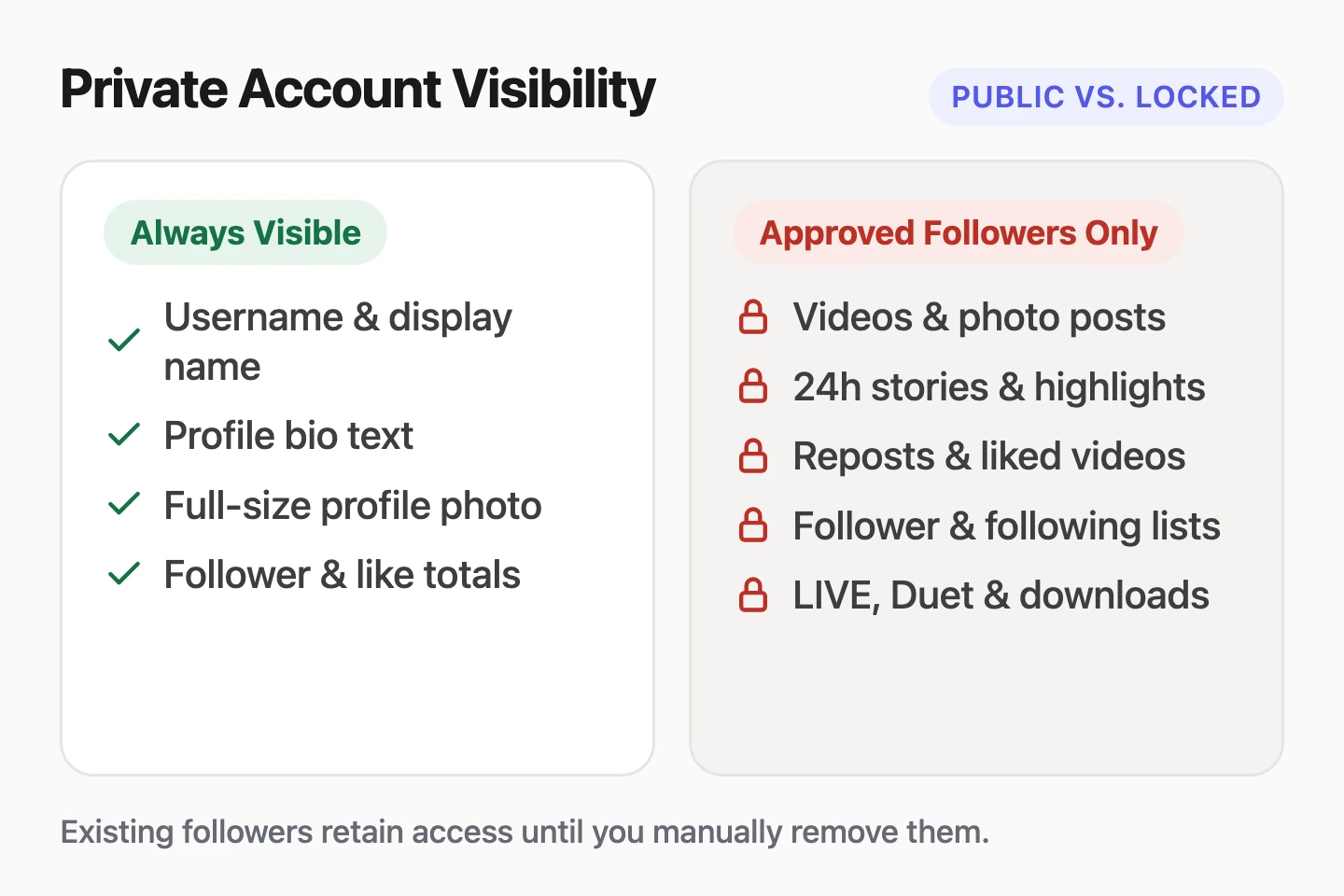
A TikTok private account restricts your videos, active stories, reposts, LIVE broadcasts, and follower lists so only people you approve can see them. Anyone outside your follower list can still search your username, read your bio, view your full-size profile picture, and check your public follower and like counts.
Whether you want to lock down your own profile, hide specific tabs without restricting your whole feed, or verify what a locked handle exposes, the exact rules matter. Below are the full visibility boundaries, step-by-step setup and reversal instructions, teen defaults, profile view history rules, and the reality behind third-party viewer sites.
What a TikTok Private Account Actually Hides (and What Stays Public)
Switching to a TikTok private account locks your content feed behind follow requests without hiding your handle from search. Strangers still need basic identity fields to recognize the right profile before requesting access.
When your account is private on TikTok, unapproved visitors cannot watch your videos on your grid or see them on the For You feed. Your active 24-hour stories, pinned highlights, reposts tab, comments, liked videos, and follower or following lists stay closed. Other users also cannot download your uploads, create Duets or Stitches, make stickers from your clips, or share your posts into their Stories.
| Profile element | Public Account | Private Account |
|---|---|---|
| Username, display name, and bio | Visible to everyone on web and app | Still visible so users can find and request to follow you |
| Profile picture (PFP) | Visible at full resolution | Still visible at full resolution |
| Follower, following, and like totals | Shown on the profile card | Totals stay visible, while member lists stay locked |
| Videos and photo carousels | Open to anyone unless individual posts are restricted | Visible only to approved followers |
| Active 24-hour stories and highlights | Visible during the 24-hour window or while pinned | Locked behind follower approval |
| Reposts tab | Visible unless the creator hides reposts separately | Locked to approved followers |
| Followers and following lists | Visible unless the creator hides those lists | Hidden from unapproved visitors |
| LIVE broadcasts and comments | Open based on post and room controls | Restricted to approved followers |
| Duet, Stitch, stickers, and downloads | Allowed when enabled in privacy settings | Disabled for other users across posts |
Turning private mode on does not remove existing followers. Anyone who followed you before the switch keeps full access to your videos, stories, and reposts until you remove them from your Followers list.
How to Make a TikTok Account Private or Switch Back to Public
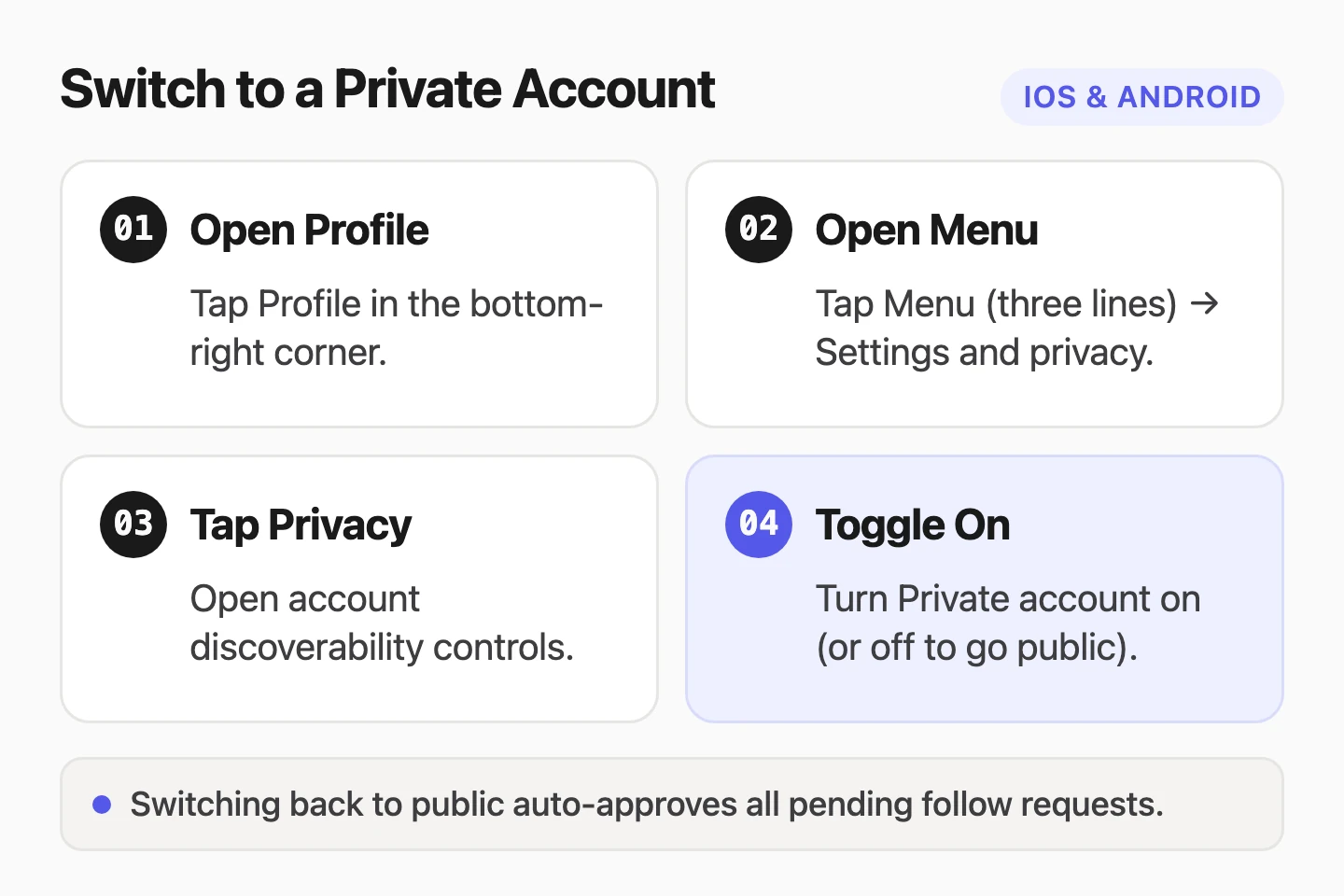
You can switch your profile to a TikTok private account in the official app in under a minute. The lock takes effect immediately and sends new follows to your follow requests queue.
Open your profile. Launch TikTok on iPhone or Android and tap Profile in the bottom-right corner.
Open settings. Tap the three-line Menu icon at the top right and select Settings and privacy.
Enter Privacy. Tap Privacy to open your account visibility and interaction switches.
Enable Private account. Toggle Private account on and confirm the prompt disabling Duet, Stitch, and downloads.
Changing Privacy on Mobile vs. Desktop
Most users search for how to make TikTok account private on mobile because the app exposes every privacy control reliably. On TikTok's desktop site, you can open Settings > Privacy > Private account after signing in, though contact sync and certain interaction controls remain easier to manage on iOS or Android. If a web toggle fails to save, change it in the mobile app.
How to Turn Off Private Account on TikTok
To make your profile unprivate again, open Profile > Menu > Settings and privacy > Privacy and toggle Private account off.
Before you turn off private account on TikTok, keep two effects in mind:
- Pending follow requests auto-approve: Every pending request is accepted automatically when you switch back to public, so decline unwanted requests first.
- Per-video privacy stays intact: Clips set to "Only me" remain hidden, while posts left on default visibility open to everyone.
Why Some New Accounts Start as a Private TikTok Account
Seeing a lock icon right after signup usually reflects age defaults rather than a glitch. TikTok sets new accounts for users aged 13–15 to a private tiktok account automatically under its teen privacy defaults, disabling Duets, Stitches, downloads, and open messaging. Users aged 16–17 receive stricter defaults on downloads, direct messages, and account suggestions even when they can switch to public.
If a mistyped birth date makes you wonder why is my new TikTok account private, you cannot override teen lockouts in the privacy menu. Submit an age correction through Settings and privacy > Report a problem with identity verification.
Hide Reposts, Following Lists, and Contacts Without Going Fully Private
You do not need to lock your entire profile just to separate reposts, your following list, or real-life contacts from your videos. TikTok privacy settings include individual switches that keep your main clips public while hiding sensitive tabs.
How to Make Reposts Private on TikTok
Creators often search for how to make reposts private on TikTok because the Reposts tab appears right on their public profile. Open Settings and privacy > Privacy to check for the Reposts visibility toggle (availability varies by app version), or open any reposted clip's Share menu and tap Remove repost. On public accounts with an open Reposts tab, anyone can browse those clips in the app or through our TikTok Repost Viewer.
Restrict Your Following List and Liked Videos
Even on a public profile, you can hide who you follow and what you like:
- Open Settings and privacy > Privacy > Following list and choose Only me.
- Open Settings and privacy > Privacy > Liked videos and choose Only me.
Once hidden, neither signed-in app users nor web tools like our TikTok Following Viewer can load your following list.
Stop TikTok From Recommending You to People You Know
Locking a profile does not automatically stop TikTok from recommending your handle to contacts. Go to Settings and privacy > Privacy > Suggest your account to others and turn off Contacts, Facebook friends, People with mutual connections, and People who open or send links to you. Then open Sync contacts and Facebook friends, turn both switches off, and tap Remove previously synced contacts.
Profile Views and Activity on a TikTok Private Account
Does TikTok show profile views on private accounts? Yes, when both accounts enable the feature, because profile view history depends on mutual opt-in rather than public-or-private status.
Under Settings and privacy > Privacy > Profile views, TikTok lists signed-in visitors from the past 30 days only if both the viewer and profile owner keep Profile view history switched on. Visiting another page while signed in with that toggle active can expose your handle even from a locked account. Turn Profile view history off to browse quietly, noting that disabling it also hides your own visitor log.
Watching a regular video or opening a Reposts tab does not trigger a notification, while liking a post, commenting, or watching a 24-hour story while signed in still places your account on that post's engagement or story viewer list.
Can You View a Private TikTok Account Without Following?
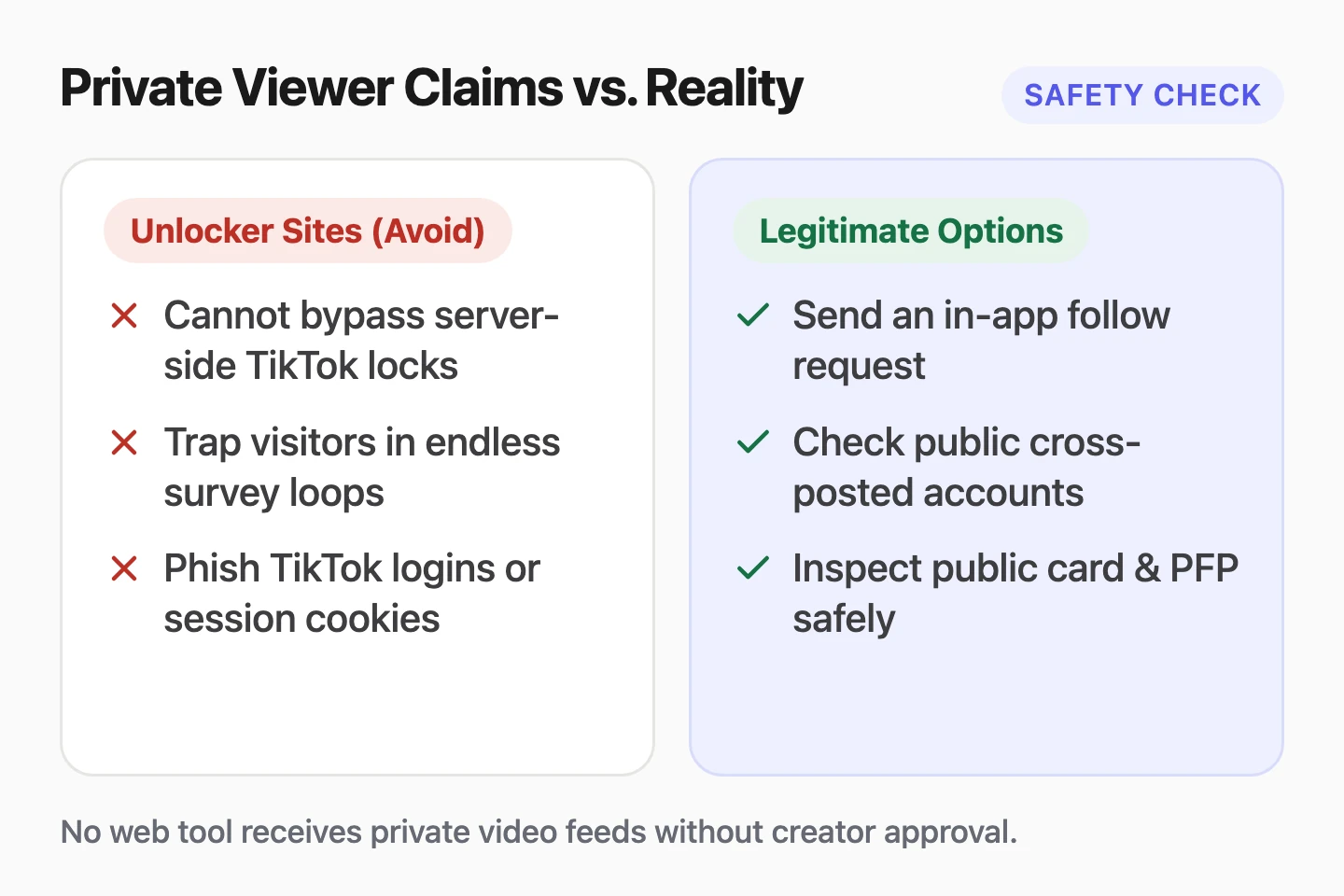
No third-party website, browser extension, or app can unlock videos, stories, reposts, or follower lists on a locked profile. TikTok enforces private account permissions on its servers, so unauthenticated requests simply do not receive restricted media files or private feed JSON.
Why "Private Account Unlocker" Sites Fail (and What Risks They Carry)
Searches for see private TikTok account, view private TikTok, and how to see private TikTok account bring up dozens of pages promising instant bypasses or "packet mirroring" tricks. Every site claiming to be an unlocker operates under the same server boundary: without an approved follower session on TikTok, private media cannot be fetched.
Sites marketing themselves as a magic TikTok private account viewer or private TikTok viewer typically fall into three patterns:
- Survey and human-verification loops: Pages simulate a fake loading bar, then trap visitors in endless ad offers or app installs that never deliver content.
- Credential phishing: Tools ask you to log in with your TikTok password or paste session cookies, putting your own account at risk of takeover.
- Bait-and-switch public viewers: The headline promises private access, while the fine print admits the tool only loads public accounts.
Legitimate Ways to Check Content or Research Public Profiles
If you genuinely need access to a locked creator's videos, the only legitimate path on TikTok is to tap Follow and wait for approval. Outside TikTok, some creators cross-post the same clips publicly on Instagram Reels, YouTube Shorts, or X under a matching handle.
When you only need to verify basic public details, inspect a creator's open profile without logging into the app, or check whether a handle is locked, use a transparent browser-based tool rather than a shady private TikTok account viewer. You can run anonymous public checks directly from the TokToolset TikTok viewer hub without exposing your personal TikTok login or triggering profile view history.
Here is exactly what TokToolset can and cannot load when you enter a handle:
- Public profiles: Inspect bios, counts, videos, photo posts, open comments, active 24-hour stories via the TikTok Story Viewer, and full profile feeds in the TikTok Account Viewer.
- Private profiles: Only the public profile card (username, bio, and totals) and original full-resolution avatar in the TikTok PFP Viewer remain accessible (1 credit per profile or avatar lookup; new accounts start with 10 welcome credits valid for 30 days).
- Automatic credit protection: If you open a restricted tab such as videos, stories, reposts, or follower lists on a TikTok private account, TokToolset stops automatically and refunds any reserved credits rather than charging you for empty results.
Frequently Asked Questions About TikTok Private Accounts
When your account is private on TikTok, can anyone see your videos?
No. Only followers you approve can watch videos, active stories, LIVE broadcasts, or reposts on a TikTok private account. Unapproved visitors cannot see your clips on your profile grid or on the For You feed, and existing followers retain access only until you manually remove them from your Followers list.
Is there a real TikTok private account viewer that bypasses privacy locks?
No legitimate web tool or app can bypass TikTok's server-side privacy controls to unlock private videos, stories, or hidden follower lists. Websites advertising instant private unlocks usually run ad-survey loops or attempt to steal credentials. Safe browser viewers only fetch public profile cards, public posts, and full-size avatars.
Does TikTok show profile views on a private account?
Yes, profile view history works on private accounts whenever both the profile owner and the visitor enable Profile views in TikTok privacy settings. The list displays signed-in visitors from the past 30 days. Turning the setting off hides your visits from others and turns off your own viewer list.
How can a TikTok private account have more views than followers?
TikTok counts repeat plays, so one approved follower replaying a clip several times raises the view counter above your follower total. Videos uploaded while your profile was previously public also keep every view earned before you switched to private mode, and replays inside approved group shares can add views too.
Can people still see my bio, username, and profile picture on a private account?
Yes. Even on a TikTok private account, your username, display name, bio, full-resolution profile picture, and total follower, following, and like counts remain publicly visible. TikTok keeps these basic card fields open so friends and other users can confirm they found the right profile before sending a follow request.
Why is my new TikTok account set to private automatically?
TikTok automatically defaults newly registered accounts for users aged 13–15 to private mode under its teen safety protections. If you entered the wrong birth date during signup, the toggle stays locked until you submit an age correction request through Settings and privacy > Report a problem with valid verification.
Ready to Check Public Profiles Safely?
Understanding how a private account works saves time and keeps you away from misleading unlocker scams. Whenever you want to verify a handle's public card, confirm whether a profile is a TikTok private account or open for public research, or browse public videos, stories, and full-size profile photos anonymously, start at TokToolset with zero TikTok login required.