How to View Someones TikTok Highlights Without Them Knowing
Learn how to view someones TikTok highlights without them knowing. Compare 4 private methods, 24-hour vs. 7-day viewer rules, PC access, and limits.

TikTok has no built-in anonymous toggle for Highlights, so opening saved Story Highlights while signed in can still place your handle on the creator's story viewer list during the tracking window. If you want to learn how to view someones TikTok highlights without them knowing, the most reliable method for public profiles is checking them outside a personal TikTok login through a web viewer, while knowing where guest browsing, secondary accounts, and in-app toggles fall short.
This guide covers how TikTok tracks Story Highlights versus 24-hour Stories and pinned videos, compares four private viewing methods, explains how to open Highlights on PC, and clarifies private-account limits.
Will They See If You View Their Highlights on TikTok?
Yes, creators can often see who opened their TikTok highlights when you watch from a signed-in account shortly after the Story was posted. Confusion spreads because people use "highlights" to describe three distinct formats with different tracking rules.
Story Highlights vs. 24-Hour Stories vs. Pinned Videos
Story Highlights appear as circular albums below a creator's bio, active Stories appear behind a colored ring on the profile photo for 24 hours, and pinned videos sit as up to three standard tiles at the top of the main video grid.
| TikTok format comparison | 24-Hour Stories | Saved Story Highlights | Pinned Feed Videos |
|---|---|---|---|
| Location | Profile photo ring | Circular albums under bio | Top of main video grid |
| Lifespan | 24 hours | Until deleted or unpinned | Until unpinned or deleted |
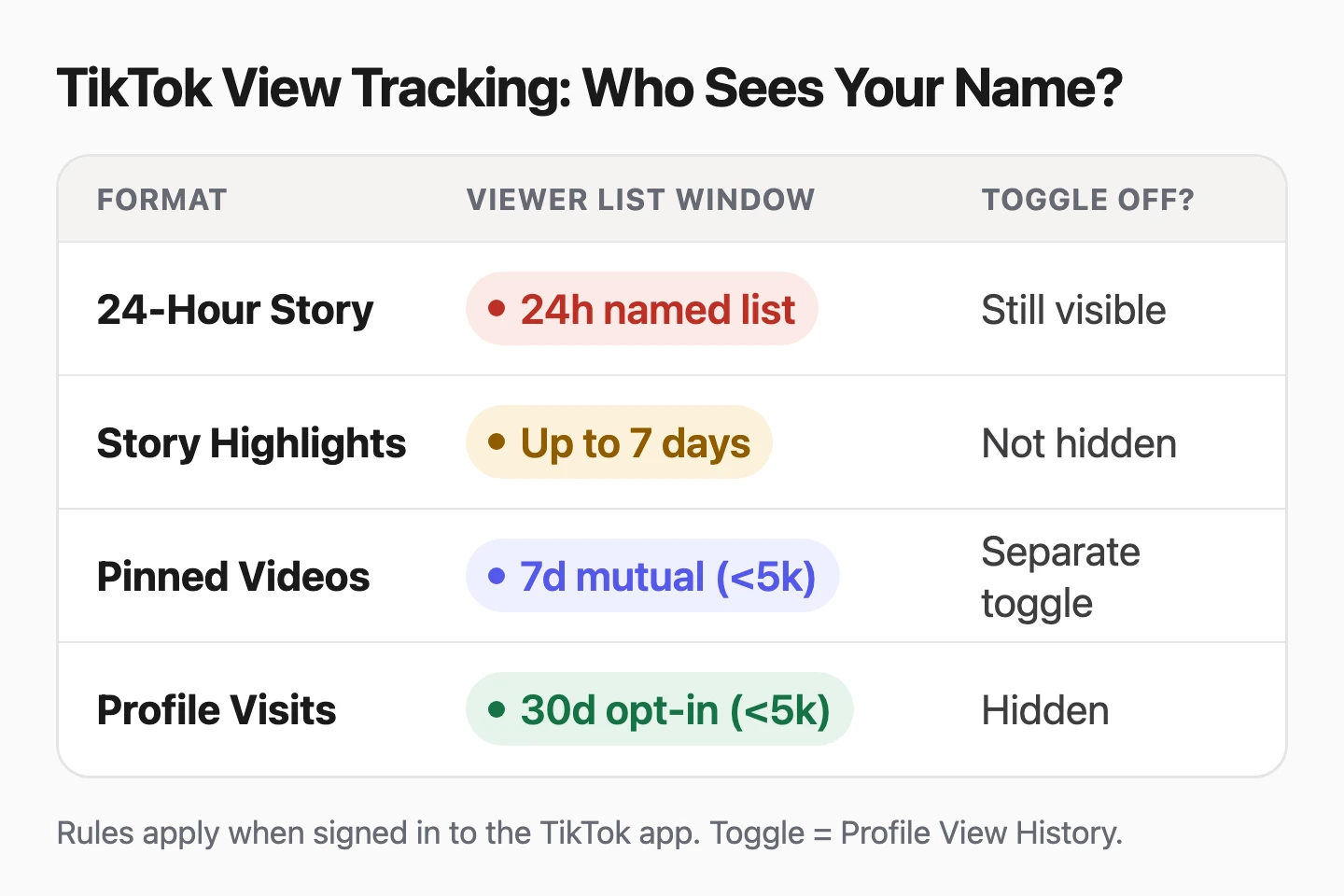
| Named viewer list? | Yes, full story viewer list | Often yes during initial post window | Only if mutual Post View History applies (<5,000 followers, 7 days) |
| Hidden if Profile View History is OFF? | No | No, not reliably in tracking window | Profile visits hidden; Post View History is separate |
When people ask can you see who views your TikTok highlights, the answer depends on the format. Pinned videos act like normal posts: creators see total views, and individual names appear only for eligible accounts (aged 16+ with under 5,000 followers) when both users enable Post View History. Saved Story Highlights inherit Story tracking instead.
When Does TikTok Highlight View Count Go Away?
Total view counts stay visible as long as the Highlight stays on the profile. Only the named viewer list expires. Active Stories show viewer names for 24 hours, while TikTok users widely report that saving a Story to a Highlight keeps viewer names visible beyond 24 hours, commonly for 48 hours–7 days after posting, before displaying a notice that the viewer list is unavailable after 7 days.
Because TikTok tests features unevenly across regions and app versions, never assume a recent Highlight hides your handle. Profile View History is separate (eligible accounts under 5,000 followers tracking profile visits for 30 days when both sides opt in): turning it off hides profile visits, not Story or recent Highlight views.
How to View Someones TikTok Highlights Without Them Knowing: 4 Methods Compared
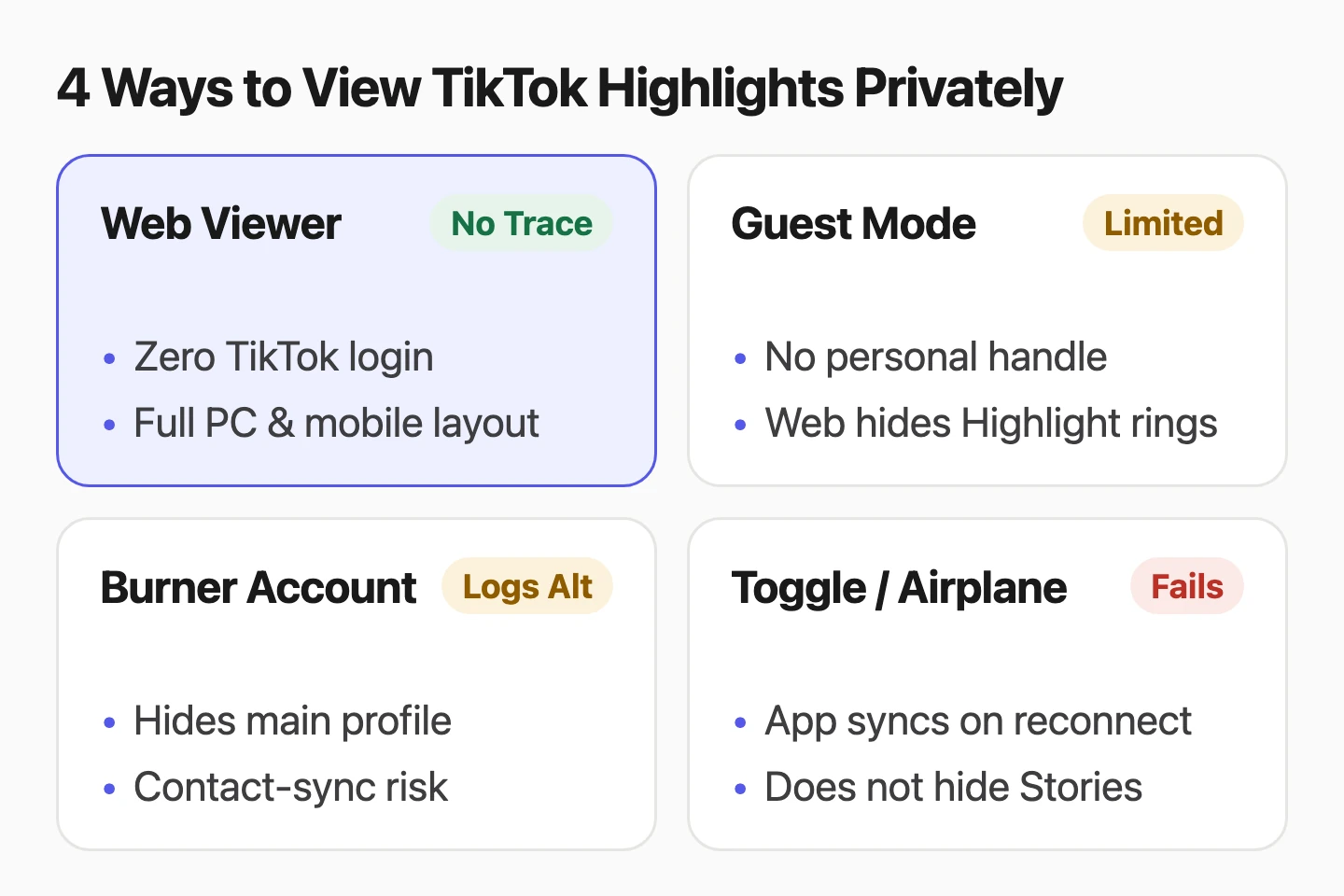
Because in-app settings cannot guarantee privacy on Story-based content, four methods dominate Reddit and YouTube discussions. Only two keep your real handle off viewer lists reliably, and two popular tricks fail.
| Anonymous viewing methods comparison | Web Viewer | Logged-Out Guest | Secondary Account | Toggle / Airplane Mode |
|---|---|---|---|---|
| Main handle exposed? | No (server lookup) | No, while logged out | Main hidden; burner logged | Yes, unreliable |
| TikTok login needed? | No | No | Yes | Yes (main account) |
| Works on PC web? | Yes | Limited; rings often missing | App works; desktop limited | App only |
| Private accounts? | No (public only) | No | Only if approved follower | Only if already following |
| Main drawback | Public only; uses credits | Login prompts, hidden Highlights | Contact-sync risk, switching | Logs sync on reconnect |
1. Web-Based Anonymous Viewer (Best for Public Profiles)
A web viewer fetches public profile data through remote servers rather than your TikTok session. With no TikTok cookie or token attached, you can watch TikTok highlights anonymously or watch TikTok stories anonymously without appearing on a story viewer list or risking accidental likes.
2. Logged-Out Guest Mode or Incognito
Incognito browsing works for standard public feed videos and bios, but tiktok.com often prompts logged-out visitors to sign in for active Stories and omits circular Highlight albums on desktop. It helps with pinned videos, not if you need how to view someones TikTok story without it showing.
3. Secondary (Burner) Account
A secondary account hides your main handle, since only the burner appears on the list. However, TikTok surfaces accounts on the same device through contact sync and friend suggestions unless locked down carefully, and switching accounts repeatedly slows down research.
4. Airplane Mode and Profile View Toggles (Why Both Fail)
How to Watch Public Stories and Saved Highlights in Your Browser
Match the tool to the age of the post. Live 24-hour clips sit in the Story ring; saved albums live in Highlights under the bio.
If a creator posted within the last 24 hours and you want to view TikTok story anonymously before it expires, run a Story lookup first. It loads up to 20 active video and Photo Mode stories per run with hours-left badges, exact public play counts, and clean media saving. For older saved folders pinned below the bio, switch to TokToolset's TikTok Highlight Viewer, which lists up to 12 public Highlight albums first and opens up to 20 saved posts per chosen album.
Follow these four steps for how to view someones TikTok highlights without them knowing (or check their active 24-hour Stories) from any browser:
Copy the public handle or link. Use a bare username, @handle, full tiktok.com/@username URL, or short vm.tiktok.com / vt.tiktok.com share link. Short links resolve to the account automatically.
Choose the matching viewer. Open the Story Viewer for live 24-hour Stories, the Highlight Viewer for saved Highlight albums, or the Account Viewer for regular pinned feed videos.
Sign in to TokToolset and search. Your TokToolset session never links to TikTok or sends a follow request. Servers fetch only publicly available profile data.
Watch in browser or save media. Click any 9:16 video or photo slide tile to play it cleanly. To save an active Story before it expires, use the Story Downloader.
Credits and Automatic Refund Rules
New TokToolset accounts receive 10 welcome credits valid for 30 days (see plans and non-expiring packs on the pricing page):
- Active Story lookups (
/tiktok-story-viewer): A first lookup reserves 13 credits (12 if the profile is already cached) for up to 20 active stories, then settles to actual cost and returns unused credits. - Highlight lookups (
/tiktok-highlight-viewer): An uncached profile costs 1 credit, listing up to 12 Highlight albums reserves 49 credits, and opening one album reserves 81 credits for up to 20 posts on demand. - Zero risk on failures: Private accounts, missing usernames, and upstream timeouts automatically refund reserved credits (0 credits used). Reopening cached results also costs 0 credits.
If you audit multiple public creators regularly, our public TikTok research workflow guide details how to combine viewers without polluting a personal account.
How to View TikTok Highlights on PC and Desktop Web
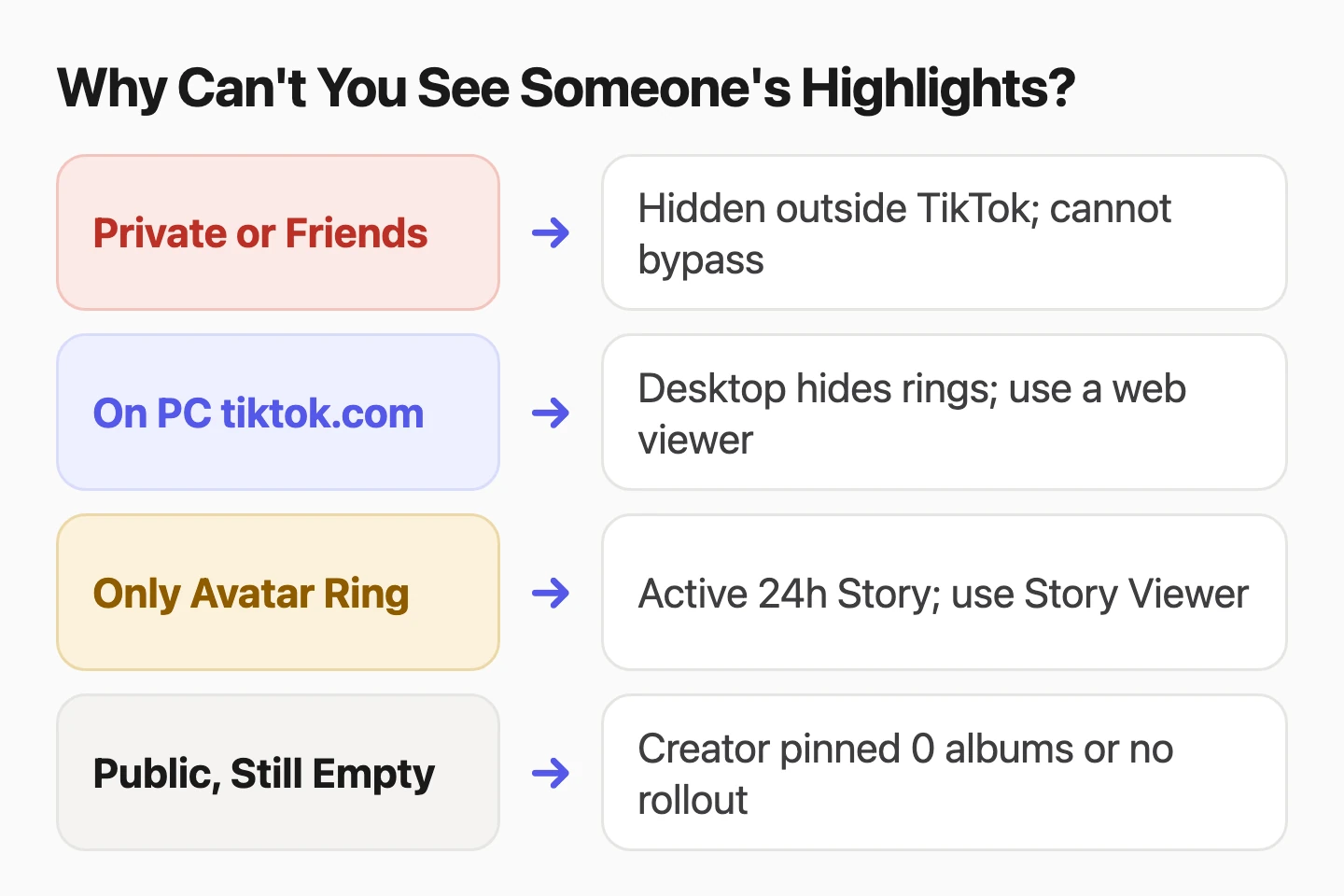
Anyone searching how to view TikTok highlights on PC hits the same wall: opening tiktok.com/@username in Chrome, Safari, or Edge shows the bio and main video grid, but usually hides the circular Story Highlights row visible in the mobile app.
Because TikTok keeps Highlights tied to mobile, trying to see story highlights on TikTok web natively rarely works, even with resized browser windows. Installing Android emulators is clunky, and third-party browser extensions requesting access to your tiktok.com cookies put your account at risk.
To learn how to see TikTok highlights on PC or Mac safely, paste the public @username or profile link into the Highlight Viewer for saved albums, or the Story Viewer for live 24-hour clips. The browser grid displays circular album covers, titles, post counts, and 9:16 video or photo cards cleanly on desktop without installing anything.
Privacy Limits: Private Accounts, Non-Followers, and Missing Highlights
External viewers only read public data that TikTok exposes to logged-out visitors. Knowing those limits prevents wasted lookups and keeps you off scam sites.
- 24 hoursActive Story window before clips expire unless saved to a Highlight
- Up to 7 daysCommon user-reported period where Highlight viewer lists stay visible in-app
- 0 accessPrivate or friends-only Highlight data any external web tool can legitimately read
Public Access vs. Private Accounts
People often ask can non followers see TikTok story highlights without sending a follow request. Yes: on any Public profile, non-followers can view public Highlight albums unless an individual clip was restricted to mutual friends.
By contrast, no online viewer can open a private profile's TikTok highlights. Avoid websites claiming "private account unlock" or asking for surveys, APK installs, or your TikTok password. On TokToolset, private profiles return a lock notice and automatically refund reserved credits.
Why a Public Profile Shows Zero Highlights
An empty result on a public account usually reflects one of four causes:
- No pinned albums: Creating Highlights is optional, and many daily creators never pin Stories.
- Rollout differences: TikTok deploys Highlight tools unevenly across regions and account types.
- Removed albums: The creator unpinned or deleted earlier collections.
- Friends-only or gated clips: Stories restricted to mutual friends or region/age gates stay hidden publicly.
This also settles a common worry: can people see if you viewed their TikTok highlights if the search comes back empty? When checked through a server-side browser tool with no TikTok login, neither loaded albums nor empty checks leave any trace.
Frequently Asked Questions
Can someone know if I view their highlights on TikTok?
Yes, if you watch while logged into the TikTok app shortly after the underlying Story was posted, your username can appear on the viewer list. If you browse a public profile through a web-based viewer without logging into TikTok, the creator receives no view record or notification.
Can you see who views your TikTok highlights after 24 hours?
Often yes during the first week. While regular Stories expire after 24 hours, many TikTok users report that saved Story Highlights keep displaying individual viewer names for up to 7 days after posting. Once that window closes, only the total view count remains visible to the creator.
If I turn off Profile View History, can people see I viewed their TikTok highlights?
Yes, turning off Profile View History only hides your profile visits from eligible accounts under 5,000 followers. It does not reliably hide your username from active Story viewer lists or recent Story Highlight viewer lists while the tracking window is still open inside the official TikTok app.
Can non-followers see TikTok story highlights on a public profile?
Yes, non-followers can open any public Highlight album on a public TikTok profile without sending a follow request, provided the creator did not restrict the original Story to mutual friends. On a private account, however, both Stories and Highlight collections remain hidden until your follow request is approved.
Can an online viewer open a private account's TikTok highlights?
No. External web viewers only read content that TikTok exposes publicly to logged-out visitors, so private accounts and friends-only Stories cannot be opened anonymously online. Avoid websites that ask for your TikTok login or claim to unlock private profiles: legitimate tools respect privacy locks and refund failed checks.
How can I view someone's TikTok highlights on a PC or laptop?
TikTok's desktop website often hides the circular Story Highlights row under a creator's bio. To browse public albums on Windows or Mac without installing an emulator, paste the creator's @username or profile link into a web-based viewer like TokToolset to load albums, videos, and photo slides directly in your browser.
Ready to Check Public Stories Without Leaving a Trace?
Whether you are researching creator formats or checking a public update without mixing it into your main feed, keeping your personal TikTok session detached is the only dependable way to stay off viewer lists. Start with the TikTok Story Viewer to put how to view someones TikTok highlights without them knowing into practice while active 24-hour clips are live, or switch to the Highlight Viewer whenever you need saved public albums on phone or PC.