How Do I Export TikTok Comments to a Spreadsheet?
Wondering how do I export TikTok comments to a spreadsheet? Compare 4 methods, get clean 14-column CSV or XLSX files with replies, and avoid Excel errors.

If you are asking "how do I export TikTok comments to a spreadsheet?", TikTok has no built-in button to download a video's comment section as CSV or Excel. To turn a public discussion into sortable rows, paste the post link into a cloud-backed web exporter, a desktop browser extension, or a scraper and save a CSV or XLSX file.
Most tutorials gloss over device limits and spreadsheet errors, leaving mobile users stuck with Chrome-only plugins and analysts fixing broken emojis or unlinked replies in Excel. Below, you will compare all four export routes, follow a login-free walkthrough for phones and desktops, inspect all 14 spreadsheet columns, and open the file cleanly in Microsoft Excel and Google Sheets.
- 14Structured columns in every CSV and XLSX export
- 100K / 250KMax top-level comments / total rows with replies
- 0TikTok logins or passwords needed to export
Four Ways to Export TikTok Comments (and Which Fits Your Device)
Choosing the best way to export TikTok comments comes down to your device and comment volume. Desktop plugins cannot run on mobile browsers, so anyone working from a phone needs a server-side web tool rather than a local add-on.
- Web cloud exporters (best for phones, teams, and large threads): A browser-based TikTok comment exporter fetches public comment pages on remote servers. You paste a link, pick CSV or XLSX, and let a background job finish without a TikTok login or an open laptop tab.
- Desktop browser extensions (quick small checks): A TikTok comment exporter extension runs in Chrome or Edge on a computer. It works for short lists, but it cannot run on phones, pauses when your laptop sleeps, and often reads through your logged-in browser session.
- Cloud scrapers and APIs (for developers): Pipelines built around third-party scrapers or the academic TikTok Research API suit multi-URL automation, but they require tokens, institutional eligibility, or scripts to flatten nested JSON into spreadsheets.
- Manual copy-paste or TikTok's account archive: Copying comments breaks formatting and drops metadata, while TikTok's built-in data download only covers your own activity.
| Export method comparison | Web Cloud Exporter | Browser Extension | Scraper / API | TikTok Data Download |
|---|---|---|---|---|
| Works on phones | Yes, any mobile browser | No, desktop Chrome/Edge only | Desktop or server setup | Yes, inside TikTok app |
| TikTok login | Not required | Uses active browser session | No, needs API key | Your own account only |
| Other videos' comments | Yes, any public post | Yes, any public post | Yes, custom setup | No, only comments you wrote |
| Nested replies | Toggle with parent ID | Varies by paid tier | Needs flattening script | Not grouped by video |
| Spreadsheet output | 14-column CSV and XLSX | CSV or XLSX | Raw JSON by default | Plain text or JSON |
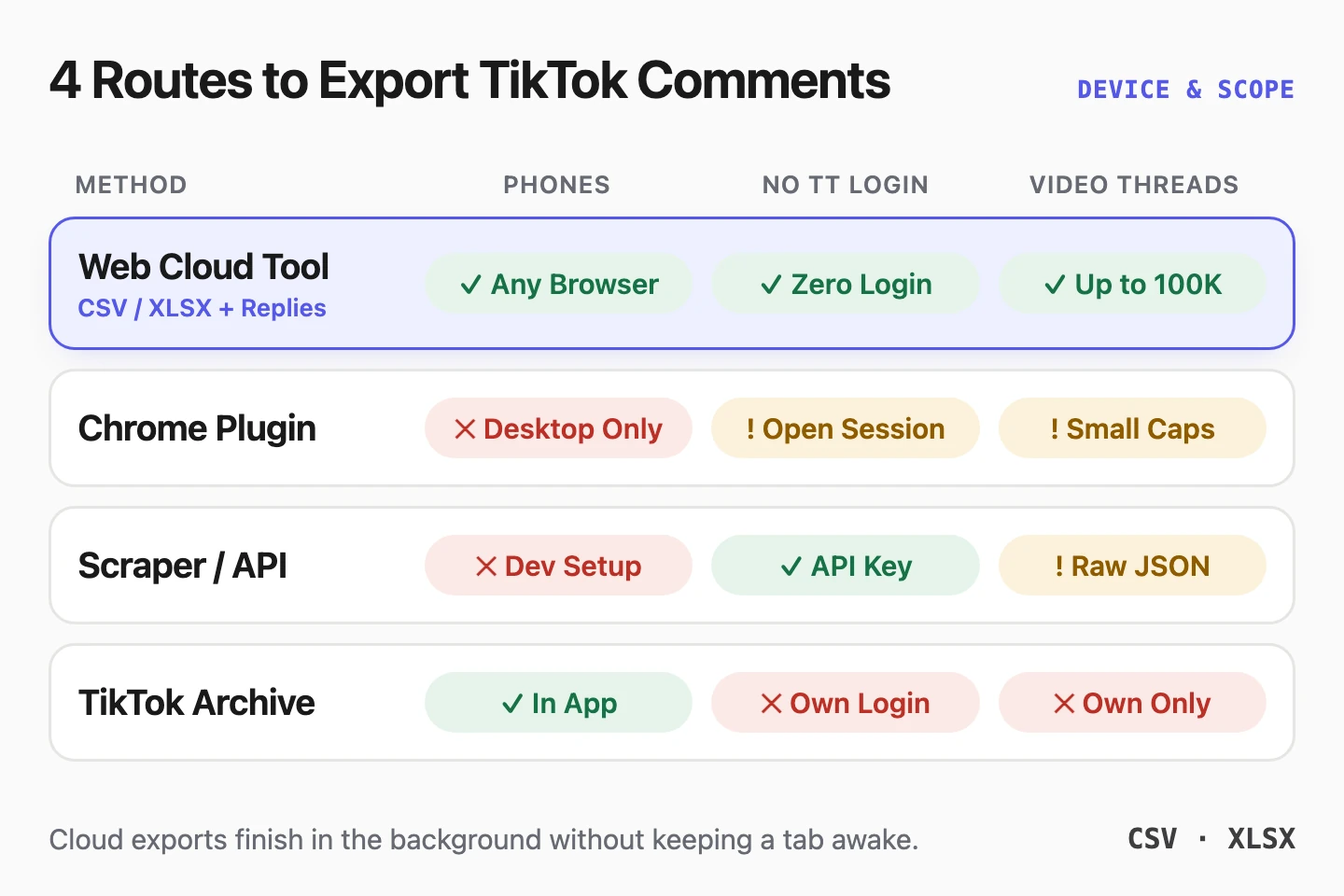
When you just need how to capture TikTok comments into a clean workbook for a giveaway, campaign audit, or product sprint, a web-based TikTok comment extractor skips setup friction and keeps your personal TikTok account untouched.
How Do I Export TikTok Comments to a Spreadsheet Step by Step
To export a public video or Photo Mode carousel without plugins, open TokToolset's TikTok Comment Viewer in any mobile or desktop browser and pick either an instant CSV or a background job.
Copy a public post link. Tap Share and Copy link on the video or photo post. Full tiktok.com URLs, short vm.tiktok.com, vt.tiktok.com, and /t/ links, and 5–25 digit post IDs all work.
Load the post in TokToolset. Sign in to a free TokToolset account (no TikTok login required), paste the URL, and click View Comments to verify the post stats and first 20 rows.
Pick instant CSV or a background task. Click Export comments. Download loaded comments now creates an instant CSV at zero extra credits, or queue a CSV/XLSX task for 500–20,000 top-level rows or All up to 100,000.
Enable replies and set a budget cap. Check Include replies when follow-up threads matter, confirm your maximum credit budget, and click Create export task.
Download from Settings → Tasks. When the cloud job completes, download your private CSV or XLSX file from Settings → Tasks on any device.
Copy a Public Post Link Instead of a Profile URL
The top mistake when learning how to export comments from TikTok video posts is pasting a @username profile link. A profile holds dozens of clips rather than one discussion thread. If you only have a handle, browse the creator's public posts in the TikTok Account Viewer first, copy the exact post link, and paste it into the comment tool. Short mobile share links resolve automatically, making phone exports painless.
Instant Loaded CSV vs Background Export Tasks
TokToolset splits small checks from large pulls so you never overpay for pages you do not need:
- Download loaded comments now (instant CSV): Each viewer page loads 20 top-level comments, and you can expand any reply thread on screen. Clicking Download loaded comments now builds a 14-column UTF-8 CSV directly in your browser at zero extra credit cost.
- Background export task (CSV or XLSX): When you need to extract comments from TikTok video threads with hundreds or thousands of remarks, pick
500,1,000,2,000,5,000,10,000,15,000,20,000, orAll available(up to100,000) top-level comments. Pages already loaded in your viewer pass into the job automatically so you never pay twice.
Include Nested Replies Without Shrinking Your Top-Level Limit
Many tools count replies against your main cap, cutting off parent comments early. TokToolset applies your selected count strictly to top-level comments; checking Include replies adds nested reply streams on top, up to 250,000 total rows. Before starting, you confirm a maximum credit budget—only successful provider calls are billed, unused credits return automatically, and partial results save if your cap is hit.
What 14 Columns You Get and How Replies Stay Linked
Every instant CSV and background CSV/XLSX download in TokToolset outputs the same 14 columns in fixed order so templates and pivot tables stay consistent across campaigns.
| Column | Format / Example | Analysis Use |
|---|---|---|
Comment ID |
Numeric string (7419...) |
Unique key for deduplication and reply lookups |
Reply To |
Parent Comment ID or blank |
Blank = top-level; populated = nested reply |
Comment |
UTF-8 text (up to 32,767 chars) | Keyword search, tagging, and sentiment review |
Nickname |
Display name | Clean attribution for quote slides |
Username |
Handle without @ |
Deduplicate commenters or giveaway entries |
User ID |
Numeric account ID | Stable ID even if the handle changes later |
Comment Date |
ISO-8601 UTC (2026-11-18T14:22:09.000Z) |
Chronological sorting and daily volume charts |
Digg Count |
Integer | Rank highest-agreement feedback and questions |
Image List |
URLs joined by | |
Spot comments containing attached images |
Reply Count |
Integer | Identify parent comments driving active debates |
Is Author Digged |
yes or no |
Filter comments endorsed by the creator |
Is Pinned |
yes or no |
Isolate pinned announcements at the top |
User Homepage |
tiktok.com/@username URL |
Direct profile reference for follow-up |
Video ID |
Numeric post ID | Combine exports from multiple videos cleanly |
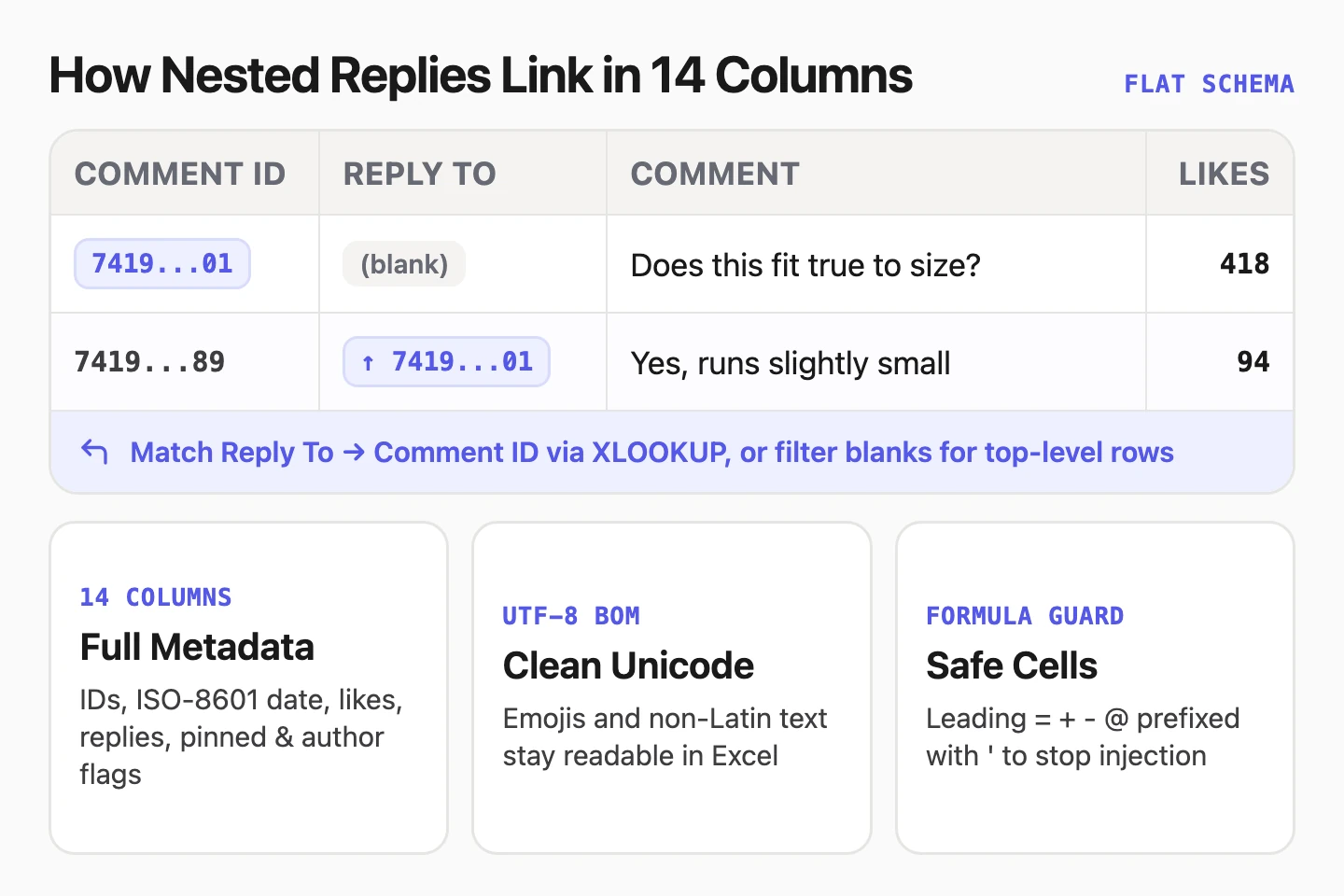
If you need a TikTok comment and its reply exporter for product or creator research, Reply To prevents context loss. Once you sort by Digg Count, a reply reading "Yes, size up" makes no sense alone—an XLOOKUP matching Reply To against Comment ID brings back the exact parent question.
How to Open and Clean Your Export in Excel and Google Sheets
Picking the right format before you download TikTok comments avoids most import glitches.
Opening CSV vs XLSX in Microsoft Excel
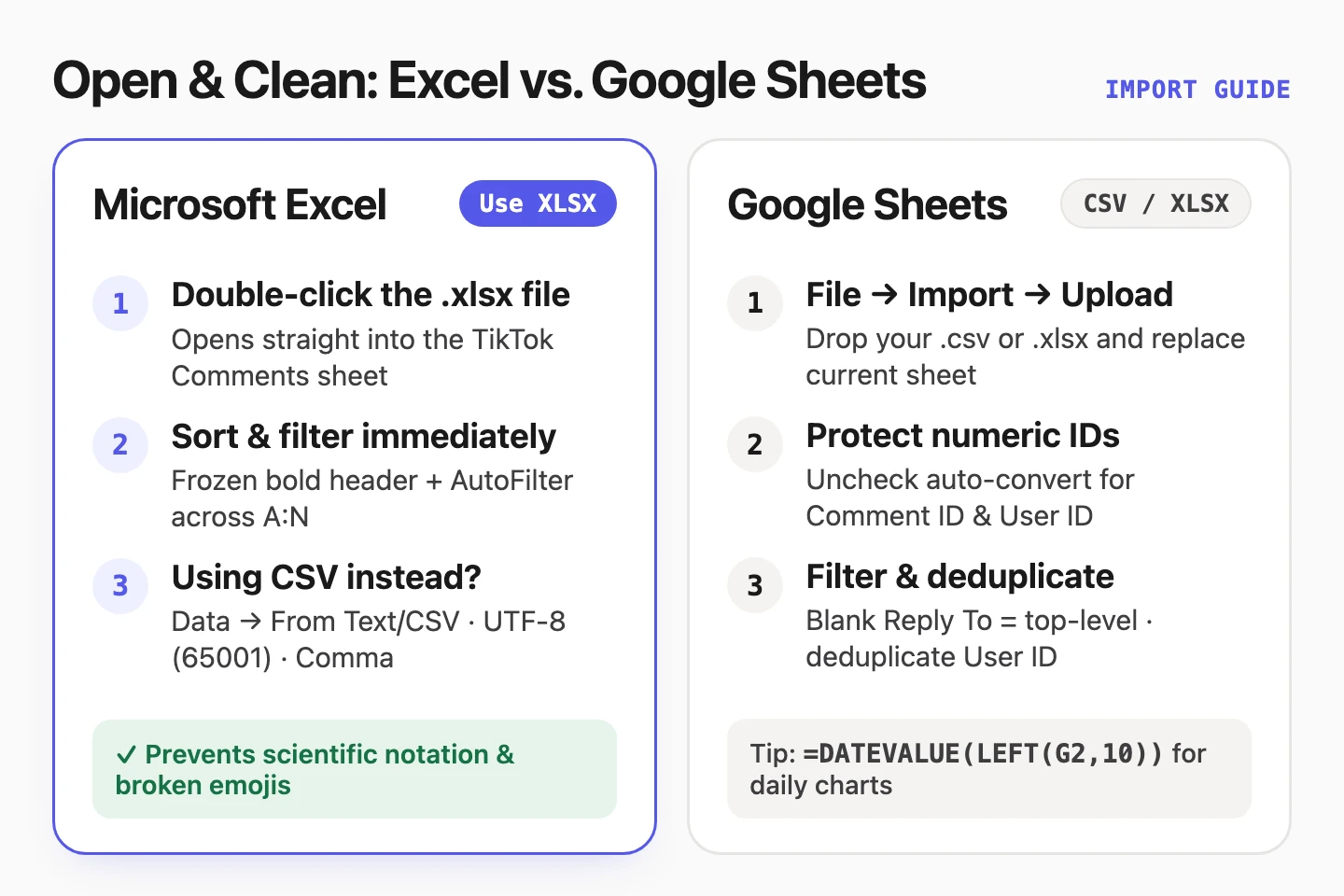
Choose XLSX when working in Microsoft Excel. TokToolset creates a native OpenXML sheet (TikTok Comments) with a frozen bold header row and AutoFilter across columns A:N, ready on double-click.
If you open a CSV on a regional Windows machine that defaults to semicolon delimiters, all fields can land in Column A. Fix that cleanly:
- Open a blank workbook and click Data → From Text/CSV.
- Pick your
.csvfile and verify File Origin is65001: Unicode (UTF-8)and Delimiter isComma. - Click Load so emojis stay intact and long numeric IDs (
Comment ID,User ID) do not turn into scientific notation (7.42E+18).
Importing Into Google Sheets for Team Review
- Open a blank sheet and go to File → Import → Upload.
- Upload your
.csvor.xlsxfile, pick Replace current sheet, and uncheck Convert text to numbers, dates, and formulas to protect long IDs. - Enable Data → Create a filter and run three quick checks: filter
Reply Toto(Blanks)for top-level counts, deduplicate onUser IDfor giveaways (or keep rows for recurring product themes), and use=DATEVALUE(LEFT(G2,10))onComment Dateto chart daily reply spikes.
Free Limits, Large-Thread Scaling, and Troubleshooting
Searching for a TikTok comment exporter free tool surfaces plenty of "unlimited" claims that break or hit paywalls after 100 rows. Knowing how cloud pagination is priced keeps your workflow predictable.
What Free Tiers Cover and How Welcome Credits Work
Real server-side pagination carries per-page provider costs, which is why "export tiktok comments free no limit" rarely exists without throttling or hidden caps. Most desktop plugins stop around 100–200 rows on free plans, and web tools typically cap free exports at 100–500 comments without replies.
TokToolset gives every new account 10 welcome credits valid for 30 days, usable on lookups and background exports including nested replies:
- Loaded comments CSV:
0extra credits after loading pages on screen. - Background top-level export: Up to 100 top-level comments per credit (
$0.005per credit at$0.001per 20-comment page), so 500 top-level comments cost 5 credits and 1,000 cost 10 credits—covered entirely by welcome credits. - High-volume posts: Answering "is there a way to mass export all the comments from a tiktok video?" takes one toggle: select All available (up to 100,000) top-level comments (up to
250,000rows with replies). See TokToolset pricing and credit packs for non-expiring packs, with automatic refunds on unused reservations.
Why Row Counts Differ From TikTok's Public Counter
Exported files often hold slightly fewer rows than TikTok's headline comment counter for four reasons:
- Deleted or moderated remarks: TikTok's display count lags behind deleted or spam-removed comments.
- Creator keyword filters: Comments held for author approval are hidden from public reads.
- Replies excluded: TikTok's counter includes replies; enable Include replies if you want them exported.
- Public scope only: Can you extract TikTok comments from private accounts, friends-only posts, deleted clips, or live chats? No—only public video and photo posts are reachable, never LIVE streams.
For deeper post audits, pair comment spreadsheets with spoken captions from TikTok Transcript, pull account audiences via the TikTok Follower Viewer, or read our TikTok public research workflow guide. Paid TokToolset accounts can also launch Comment Analytics AI to download a quote-cited PDF, Markdown, or Word report bundled with comments.xlsx.
Frequently Asked Questions
Can you extract TikTok comments without logging into TikTok?
Yes. A server-side web tool like TokToolset fetches publicly visible video and photo comments through its own infrastructure, so you never type a TikTok password, scan a QR code, or connect a TikTok profile. You only sign in to a free TokToolset account, leaving zero trace on the creator's notifications.
How do I export TikTok comments to a spreadsheet from a phone?
Browser extensions do not run on mobile Chrome or Safari, so use a cloud-backed web exporter instead. Tap Share and Copy link on the public TikTok post, paste it into TokToolset's Comment Viewer in your phone browser, start a background CSV or XLSX export, and download the finished file from Settings → Tasks.
How to export TikTok comments free without hitting hidden paywalls?
Sign up for a free TokToolset account to receive 10 welcome credits valid for 30 days. You can download already-loaded comments as a 14-column CSV at zero extra cost, or spend welcome credits on a background CSV or XLSX export covering up to 1,000 top-level comments before needing a credit pack.
Does a TikTok comment export include nested replies?
Yes, when you enable Include replies before starting a background export. TokToolset keeps your chosen top-level comment count intact while fetching nested reply streams up to 250,000 total rows. Every reply populates the Reply To column with its parent Comment ID so conversations stay linked in Excel and Google Sheets.
Is there a way to mass export all the comments from a TikTok video?
Yes. Choose All available (up to 100,000 top-level comments) inside TokToolset's background export dialog, or include replies for up to 250,000 total rows. The job runs asynchronously in the cloud so your browser never times out, charges only completed pages, returns unused budget automatically, and saves partial results if your cap is reached.
Should I download TikTok comments as CSV or XLSX for Excel and Google Sheets?
Pick XLSX when working primarily in Microsoft Excel because TokToolset pre-formats a frozen bold header row, applies AutoFilter across all 14 columns, and preserves Unicode cleanly. Pick CSV when importing into Google Sheets, BI tools, or scripts; every TokToolset CSV includes a UTF-8 BOM and automatic formula-injection neutralization.
Ready to Export Your First Comment Spreadsheet?
Stop scrolling past hundreds of replies or fighting desktop-only plugins. Paste any public TikTok link or post ID into TokToolset to solve how do I export TikTok comments to a spreadsheet in minutes—with 14 clean columns, linked nested replies, UTF-8 safety, and 10 welcome credits to run your first CSV or XLSX export today.