Can You Watch TikTok Without an Account?
Wondering can you watch TikTok without an account? Yes—in any browser. Compare 4 working methods, mobile redirect fixes, guest limits, and privacy rules.
Short answer: yes. If you are asking, "Can you watch TikTok without an account?" you can play public clips in desktop browsers, mobile browsers, app guest mode, or a free single-post web player with zero sign-up. Most roadblocks come from mobile short links forcing app-store redirects and web feeds triggering a login wall after a few videos. Below are the exact limits of TikTok without account credentials, four reliable ways to watch, common fixes, and what creators actually see.
What You Can and Cannot Do on TikTok Without an Account
You can watch public videos, view Photo Mode carousels, and browse limited discovery feeds without registering, while interactive features and private profiles stay locked. People ask "do you need an account to watch TikTok" or "can you use TikTok without an account" because access splits cleanly between passive viewing and engagement.
| Feature availability | Without a TikTok Account | Logged-In TikTok Account |
|---|---|---|
| Public videos & Photo Mode posts | Yes, via browser, guest mode, or web viewer | Yes, full access everywhere |
| For You and Explore feeds | Limited; web prompts login after a few clips | Unlimited personalized For You page |
| Creator & hashtag search | Partial; search and profile grids hit sign-in gates | Full search across users, sounds, tags |
| Full comments & replies | Restricted on mobile web; needs desktop or lookup tool | Full comment threads and sorting |
| Active Stories & Reposts | Hidden on signed-out web; needs dedicated lookup | Visible on public and followed accounts |
| Public TikTok LIVE streams | Sometimes playable on desktop web or live lookup | Full LIVE viewing, chat, and gifts |
| Like, comment, follow, DM, private accounts | Blocked without signing in | Available (private profiles need approval) |
Three hard limits apply no matter how you view TikTok without account sign-in:
- Private and friends-only profiles: Restricted on TikTok's servers to approved followers; no external tool can unlock them.
- Deleted videos: Once removed by the creator or TikTok, public playback stops immediately.
- Age-gated or region-locked posts: 18+ clips and regionally restricted audio require an eligible logged-in session.
How to Watch TikTok Without an Account: 4 Working Methods
The best way to watch TikTok without account friction depends on your device and whether you already hold a specific video link. Matching the method to your task prevents app-store bounce loops and dead ends.
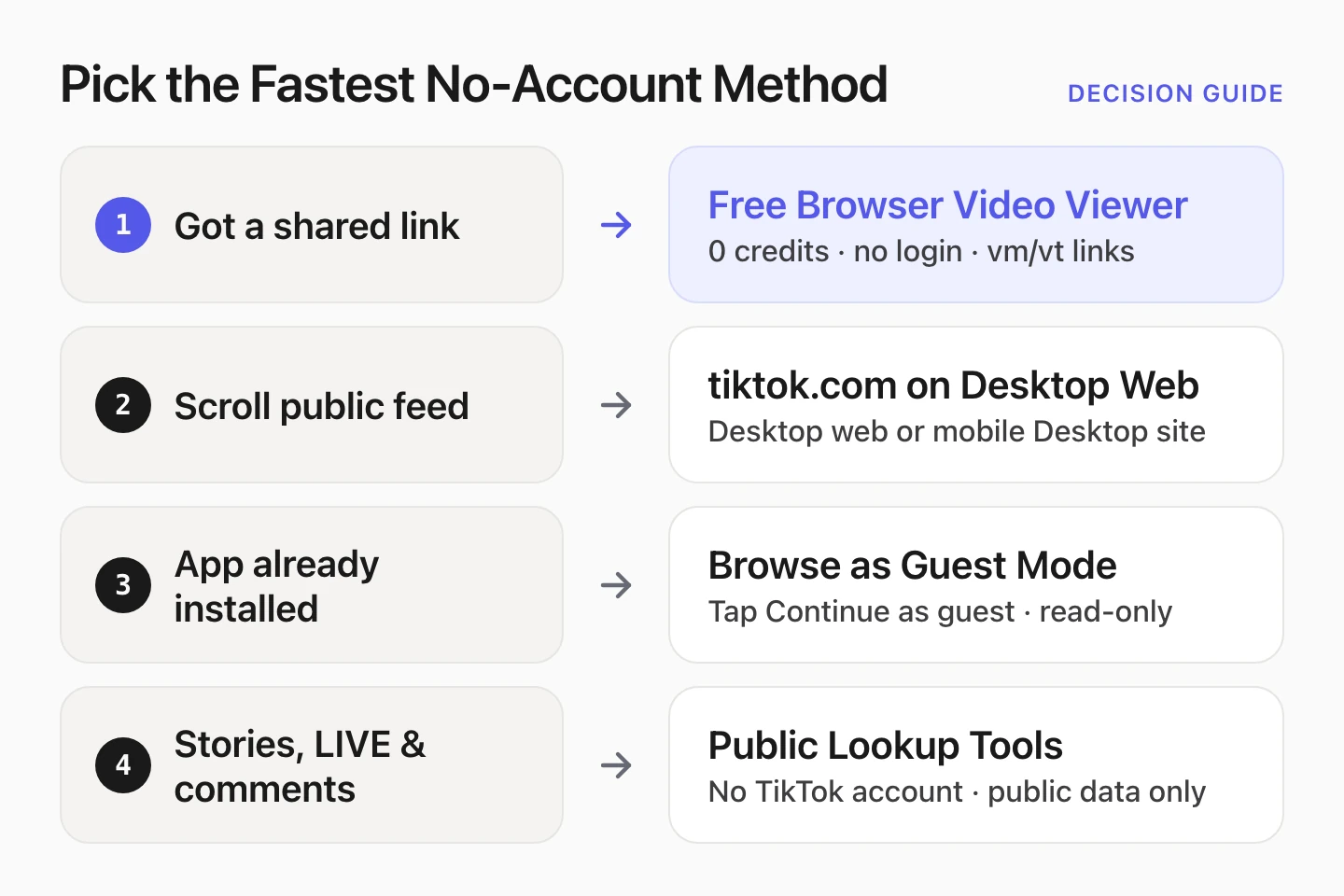
1. Play Any Shared Link in a Free Browser Video Viewer (No App Redirects)
When someone texts you a clip in iMessage, WhatsApp, Discord, or Slack, a single-post web player is the fastest way to watch TikTok without app installs. Tapping a compressed vm.tiktok.com or vt.tiktok.com link inside a chat app usually sends your phone straight to the App Store or Google Play—which is why so many iPhone users ask "is there a way to watch TikTok without app on iPhone."
Using a TikTok viewer without account barriers breaks that redirect loop. On TokToolset's TikTok Video Viewer, watching any public post costs 0 credits and requires neither a TikTok login nor a TokToolset account.
Copy the shared link or numeric post ID. Long-press the message and copy a
tiktok.com/@username/video/...or/photo/...URL, a shortvm.tiktok.com,vt.tiktok.com, ortiktok.com/t/link, or a 15–25 digit post ID.Paste it into the player and click View Now. TokToolset expands mobile short links on its servers and loads TikTok's official 9:16 embedded player so you can watch TikTok video on web without account pop-ups.
Watch cleanly or hand off to post tools. You get captions, audio titles, timeline scrubbing, mute, and fullscreen with no algorithmic feed. Need MP4 downloads, MP3 audio, transcripts, or comments later? One-click action cards carry the same link forward.
Photo Mode carousels work the same way: pasting a /photo/ link switches the side panel to slide-image and slideshow tools. If a creator disabled third-party embedding on an otherwise public clip, the player catches the error and offers a Play through TokToolset fallback via TikTok Video Downloader (which uses a free TokToolset sign-in and credits).
2. Browse TikTok.com on Desktop or Mobile Web (With the Desktop-Site Trick)
To scroll public videos casually instead of opening one link, visit tiktok.com directly. Desktop browsers deliver the most reliable TikTok no login experience because TikTok serves a full layout with fewer install banners.
To view TikTok without login on a computer:
- Open Chrome, Safari, Edge, or Firefox (an incognito window keeps the session clean).
- Visit
tiktok.comor go straight to a public creator page attiktok.com/@username. - Close the sign-in pop-up with the
Xbutton or choose Continue as guest. - Click any public video to watch with sound and scrub the timeline.
On phones, mobile web pushes the app much harder. To watch TikTok in browser without account prompts on mobile:
- iPhone (Safari): Open the URL, tap the address-bar menu (
aAor page settings), select Request Desktop Website, and reload. - Android (Chrome): Tap the three-dot menu, toggle Desktop site, and refresh.
- Strip query parameters on full URLs: On an expanded link like
tiktok.com/@creator/video/7123456789012345678?is_from_webapp=1, deleting?and everything after removes tracking tags that trigger app prompts. This trick does not unpack shortvm.tiktok.comorvt.tiktok.comlinks on its own.
3. Use "Browse as Guest" in the Official TikTok App
If the app is already on your phone and you simply do not want a profile, official guest mode works out of the box. Here is how to view TikTok as a guest:
- Open the TikTok app and tap Continue as guest (or skip the registration prompt).
- Skip or select optional interest tags to load a generic For You page.
- Scroll public videos and run basic searches while you watch TikTok without logging in.
The downside is obvious: you still install the TikTok app, share device-level telemetry, and hit sign-up prompts whenever you tap comments, likes, or favorites. If you want to stay off the app entirely, stick to Method 1 or Method 2.
4. Check Public Profiles, Comments, Stories, and TikTok LIVE Without an Account
Signed-out web browsing breaks down fast once you look beyond one clip. Mobile web hides deep comment threads, active Stories disappear, and profile grids often freeze.
Dedicated public lookup tools cover those workflows without asking for a TikTok login:
- Public profiles and video grids: Inspect bio details, stats, and public clips with TikTok Account Viewer.
- Comments and replies: Anyone trying to read TikTok comments without app sign-ins can paste a video link into TikTok Comment Viewer to browse public threads and export replies.
- Active Stories: Check public 24-hour stories via TikTok Story Viewer.
- Live streams: To watch TikTok LIVE without account sign-ins on TikTok, try desktop web or verify active rooms with TikTok LIVE Viewer.
While the single-post video embed player is free and anonymous, server-fetched lookup tools require a free TokToolset sign-in and shared credits. New accounts receive 10 welcome credits valid for 30 days, display costs upfront, and refund failed lookups automatically—strictly for public data.
Why TikTok Forces You to Log In (and How to Fix Common Roadblocks)
When a pop-up interrupts your third clip, it is easy to ask again: can you watch TikTok without an account smoothly, and why is TikTok forcing me to make an account right in the middle of browsing? TikTok tightens web login walls to drive app installs, build engagement profiles, and rate-limit unauthenticated scraping.
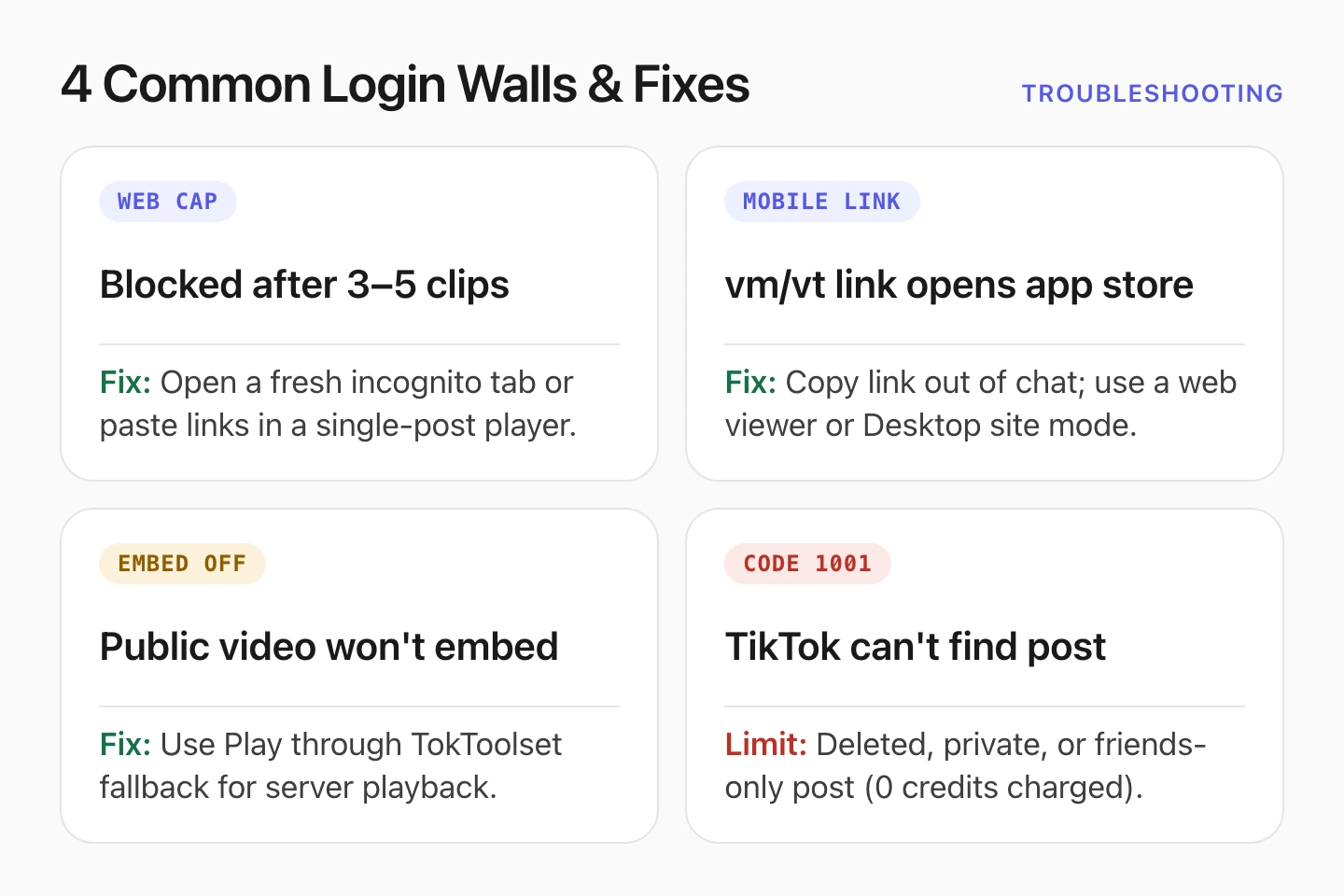
Use these fixes for the four most common roadblocks when using TikTok without login:
- The 3-video browser login wall: Scrolling past three to five web clips triggers a blocking modal. Open a fresh incognito tab to reset the session counter, or paste individual links into an embedded player to avoid feed caps.
- TikTok won't let you watch without the app on mobile: In-app chat browsers push
vm.tiktok.comandvt.tiktok.comURLs to the app store. Copy the URL instead of tapping it, then paste it into a web viewer or turn on Request Desktop Website. - Creator disabled external embeds: Some public posts play on
tiktok.combut fail inside third-party frames when embedding is turned off. Click Play through TokToolset to load the post through server-fetched playback instead. - Deleted or private post (error code 1001): If the player reports "TikTok couldn't find this post," the video was deleted, switched to friends-only, or sits on a private account. Zero credits are charged.
Privacy Check: Can Creators See If You Watched Without an Account?
No creator can see your handle when you watch TikTok without account credentials, because TikTok's viewer lists only track logged-in profiles. Still, people ask "can someone see if you viewed their TikTok without an account" because creator visibility and platform tracking work differently.

- Creator visibility (Post View History & Profile View History): TikTok's Post View History and Profile View History only show logged-in accounts when both sides opt in. Signed-out playback passes no
@username, so your visit increments the public view counter without naming you. - Browser cookies and platform telemetry: Visiting
tiktok.comstill shares standard web signals such as IP address and browser type. Crucially, embedded players load directly fromtiktok.com—so if you previously signed into TikTok in that same browser, an active login cookie can still identify your session.
To stay completely separate from any personal TikTok profile, sign out of tiktok.com or open an incognito window before watching. Recent links pasted into TokToolset stay only in local browser storage and clear in one click.
Frequently Asked Questions: Can You Watch TikTok Without an Account?
Can you watch TikTok without an account for free?
Yes, you can watch public TikTok videos for free without creating an account. Visit tiktok.com in a desktop or mobile browser, use Browse as guest inside the app, or paste any shared link into TokToolset's free TikTok Video Viewer for instant 0-credit browser playback with zero sign-up required.
Do you need an account to watch TikTok on iPhone or Android without the app?
No. On iPhone Safari or Android Chrome, copy the shared TikTok link instead of tapping it inside a chat app. You can either turn on Request Desktop Website in your mobile browser or paste the vm/vt short link into a web video viewer to watch without installing the app.
How do you view TikTok as a guest?
Download or open the TikTok app and tap Continue as guest or skip the sign-up screen when prompted. You can scroll a generic For You feed and watch public clips without logging in, though liking, commenting, following creators, and saving favorites remain locked until you register an account.
Can someone see if you viewed their TikTok video or story without an account?
No creator can see your identity when you are signed out, because Post View History and Profile View History only list logged-in accounts that opted in. Just make sure you are not still logged into tiktok.com in the same browser—use an incognito tab to keep existing cookies separate.
Why is TikTok forcing me to make an account after a few videos?
TikTok triggers login walls on unauthenticated web sessions after three to five clips to encourage app installs, personalize feeds, and limit automated scraping. Opening a fresh incognito window clears the session counter, while pasting individual shared links into a single-post browser viewer avoids feed-level sign-in prompts completely.
Can you watch TikTok LIVE or read comments without an account?
Partial desktop web access sometimes plays public TikTok LIVE rooms and top comments, but mobile browsers usually hide full comment threads behind a login prompt. For reliable public research without a TikTok account, dedicated tools let you inspect public comments, replies, active stories, profiles, and live status.
Watch Any Shared TikTok Link Free in Your Browser
You do not need an app or profile just to watch a shared clip. Use a single-post web player for chat links, switch to desktop mode for casual scrolling, and keep an incognito tab handy for cookie separation.
Ready to test can you watch TikTok without an account without app-store redirects or login walls? Paste any public video URL, Photo Mode link, vm.tiktok.com share link, or numeric post ID into our free TikTok Video Viewer—watching costs 0 credits and needs no sign-in. For optional MP4 downloads, audio extraction, or comment exports, check TokToolset plans and credits with 10 welcome credits for new accounts.