How to Download TikTok Sounds on Phone and PC
Learn how to download TikTok sounds as 192 kbps MP3 files on iPhone, Android, Mac, and PC, compare Original sound vs. video audio, and fix common errors.
TikTok has no built-in button to export an audio file, so knowing how to download TikTok sounds comes down to two practical options: pasting a public post link into a browser MP3 converter, or saving an allowed video and extracting its audio locally. Tapping Add to Favorites only bookmarks a track inside the app. This guide covers browser extraction, Original sound versus Video audio, device paths, native workarounds, bitrate reality, and troubleshooting.
Can You Download TikTok Sounds? In-App Favorites vs. Real Audio Files
No native TikTok button writes an .mp3 file to your device. Tapping the spinning sound disc and choosing Add to Favorites stores an account bookmark for future drafts; nothing enters iPhone Files or desktop Downloads, and playback breaks if the sound is deleted.
That gap explains why desktop users look up how to see your saved sounds on TikTok on computer and find that the web app focuses on playback instead of file export. To keep an offline file for editing or listening, extract the audio from a public post.
| Comparison of methods to save TikTok sounds | Output File | Track Choice | Audio Clarity | Best For |
|---|---|---|---|---|
| In-app Add to Favorites | App bookmark only | Attached sound only | Streams inside app | Reusing sounds in TikTok drafts |
| Browser MP3 converter | 192 kbps stereo MP3 | Original sound or Video audio | Clean server transcode | Fastest cross-device MP3 export |
| Save video + local extract | M4A or MP3 via app | Merged video audio only | Clean if Save Video is on | Offline extraction without web tools |
| Screen recording | Screen MP4 converted | Full playback mix only | Lowest (re-encoded) | Last resort when other paths fail |
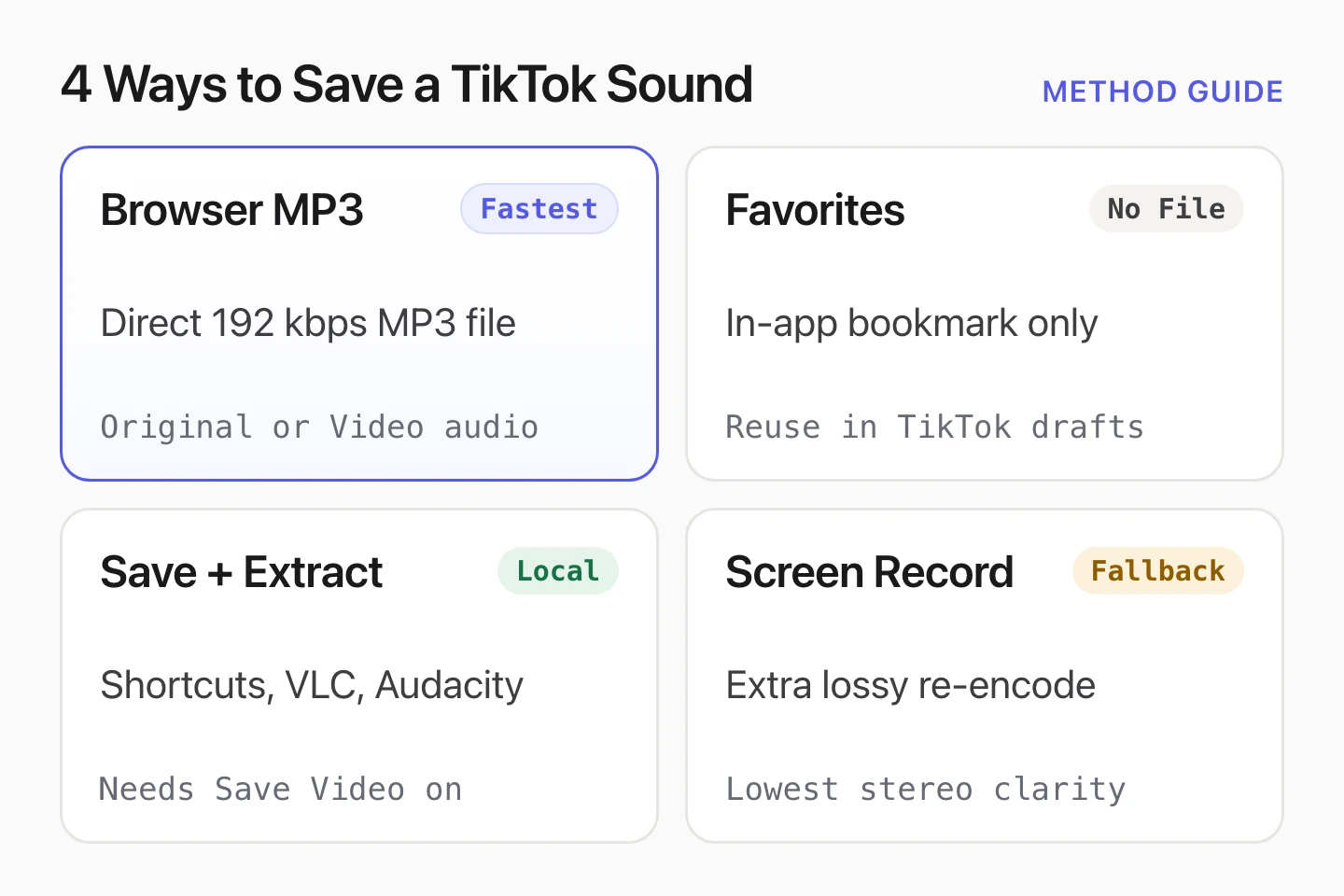
For most users looking to download TikTok sounds on mobile or desktop, a browser extractor delivers the cleanest file and full track control. Local extraction works when Save Video is enabled, while screen recording remains a last resort.
How to Download TikTok Sounds as MP3 in Your Browser
The fastest answer to how to download audio from TikTok on any device is a browser MP3 extractor that reads a public post link directly. You never need a TikTok login, mobile app, or browser extension, and creators receive zero notifications.
With TokToolset's TikTok to MP3 converter, new free accounts receive 10 welcome credits valid for 30 days with no card needed. A public post lookup costs 1 credit and each MP3 export costs 1 credit, with automatic refunds if a run fails. A 30-minute encrypted cache also lets you switch to connected post tools with zero repeat lookup cost.
Copy a public post link. Open the clip or musical carousel on TikTok, tap Share, and select Copy link. Full tiktok.com URLs, vm or vt short links, and numeric IDs work.
Load the post in TokToolset. Paste the URL in your browser and sign in to your free account. A 1-credit lookup loads the preview and every available audio track.
Pick Original sound or Video audio. Choose Original sound for the attached music track, or Video audio to keep speech, commentary, and sound effects from the clip.
Save your 192 kbps MP3. Click Download MP3 (1 credit) for a fast server conversion to 44.1 kHz stereo MP3. Temporary server folders delete immediately after streaming.
When you download TikTok audio this way, the server discards video frames completely and adds zero voice tags, leaving a clean stereo file whenever you download TikTok sound assets.
Original Sound vs. Video Audio: Which Track Should You Save?
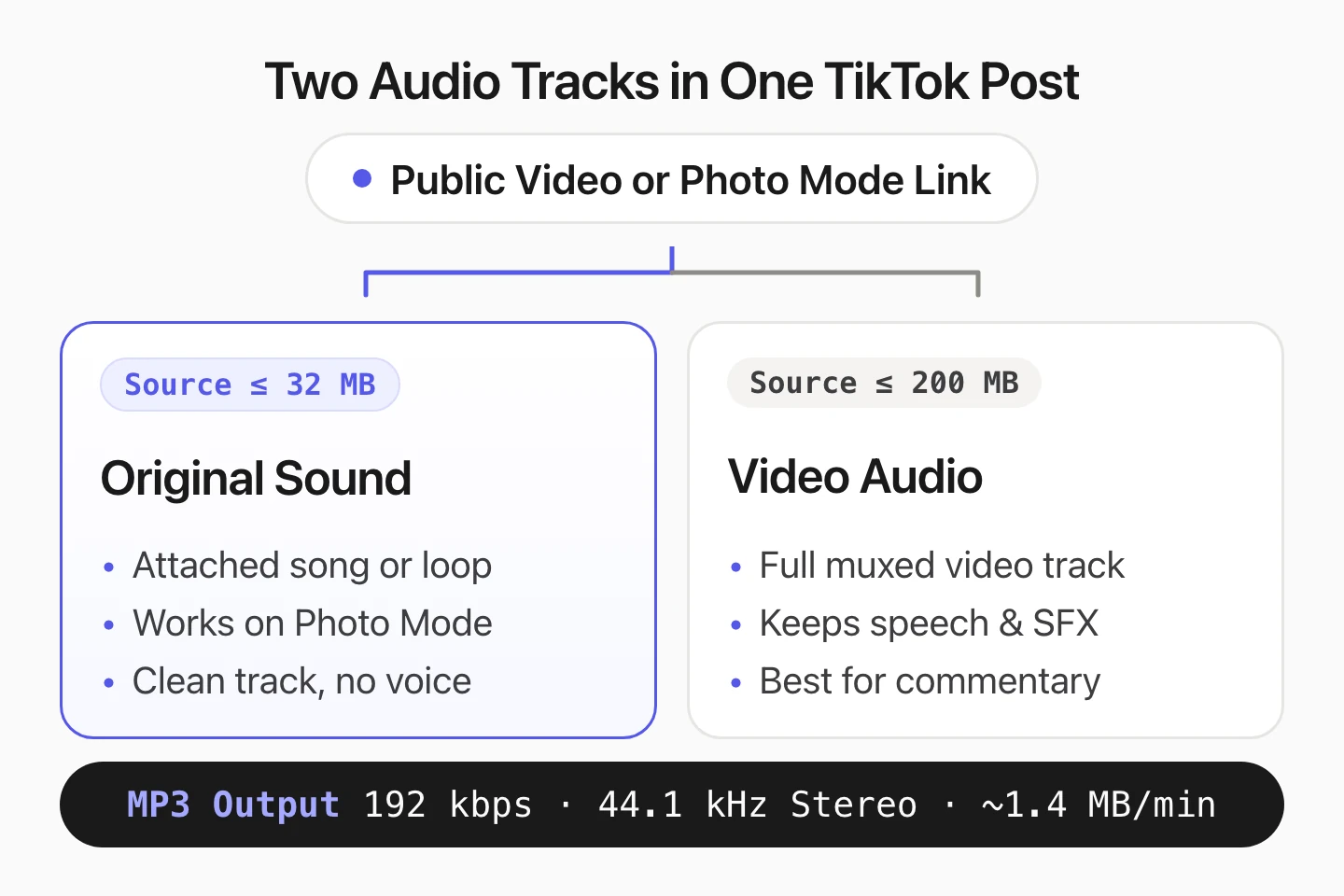
A public TikTok post can hold two audio sources, so picking the right lane before you download sound from TikTok avoids unwanted dialogue or missing voiceovers.
- Original sound (attached track): The standalone music or loop linked at the bottom of the clip, including synced songs on Photo Mode carousels (up to 32 MB source). Pick this when you want to know how to download only TikTok sound assets.
- Video audio (full video mix): The complete soundtrack inside the video file (up to 200 MB source). Choose this for spoken commentary, room ambience, or sound effects mixed over background music.
Once you see how to download a TikTok sound, you can reuse the 30-minute post cache in TikTok Song Finder to identify the track title and artist, or open TikTok Slideshow Downloader to export musical photo carousels as video.
How to Download TikTok Sounds on iPhone, Android, Mac, and PC
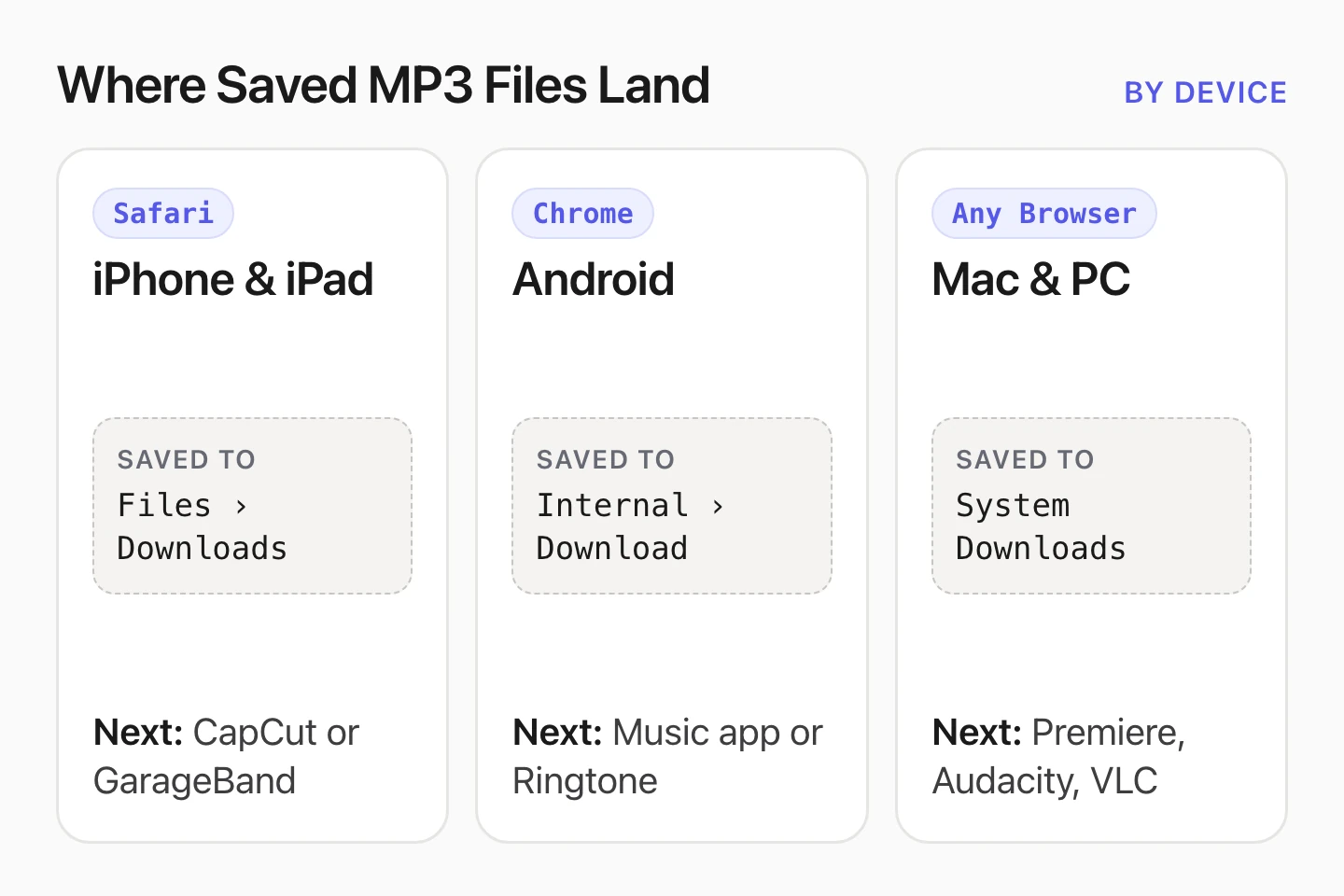
The link-and-convert flow works the same in every modern browser; only the default save folder changes by operating system.
iPhone and iPad (Safari to Files)
Safari downloads MP3 files natively, making how to save a TikTok sound to Files on iPhone quick without extra file apps.
- Open the public post in TikTok and tap Share > Copy link.
- Paste the URL into TokToolset in Safari, load the post, and tap Download MP3 on your chosen track.
- Confirm the prompt, tap Safari's downward download arrow, and open Downloads.
- Tap the magnifying glass beside the
.mp3to open it in Files > Downloads for offline playback, CapCut, or GarageBand.
Android (Chrome to Downloads)
For anyone checking how to download TikTok sounds on Android, Chrome writes the converted MP3 directly into local storage.
- Copy the public clip link via Share > Copy link in TikTok.
- Open Chrome, paste the URL into TokToolset, and load the post.
- Tap Download MP3 next to Original sound or Video audio.
- Open the finished
.mp3from your notification shade or Files by Google > Downloads (Internal storage > Download).
How to Download TikTok Sounds on PC and Mac
Desktop browsers give you direct access to editing suites on Windows or when checking how to save a TikTok sound as an MP3 on macOS.
- Copy the post URL from
tiktok.comin Chrome, Safari, Edge, or Firefox. - Paste the link into TokToolset and choose Original sound or Video audio.
- Click Download MP3 to save directly to your system Downloads folder (
~/Downloadson Mac orDownloadson Windows). - Drag the
.mp3into Premiere Pro, Final Cut Pro, DaVinci Resolve, Logic Pro, Audacity, or VLC.
How to Extract Audio From a TikTok Without Third-Party Websites
If you prefer to download sounds from TikTok purely with local apps, and the creator enabled TikTok's Save video option, save the MP4 first and strip the audio on your device.
- iPhone (Apple Shortcuts): Save the video to Photos (or export a clean clip with TikTok Video Downloader). In Apple Shortcuts, add Select Photos (Videos only), Encode Media with Audio Only toggled on (M4A), and Save File to
Files > Downloads. - Windows and Mac (VLC or Audacity): In VLC, open Media > Convert / Save, load the
.mp4, pick Audio - MP3, and save. In Audacity (with FFmpeg installed), drop the.mp4onto the timeline, trim the exact segment if you need to know how to download sound clip from TikTok footage, and export MP3. - Avoid screen recording when possible: Screen capture adds another lossy re-encode, flattens stereo quality, and picks up system chimes. Keep it strictly as a fallback.
Audio Quality, Bitrate, and Using Downloaded Sounds
Many web converters advertise "320 kbps lossless" audio, yet TikTok compresses uploads into AAC streams before playback. Upscaling a compressed stream to 320 kbps bloats file size without adding detail. When you download TikTok sounds MP3 files through TokToolset, the encoder outputs 192 kbps, 44.1 kHz stereo MP3 (about 1.4 MB per minute, up to a 40 MB cap), matching the source stream's real clarity cleanly.
After saving your .mp3, three common workflows cover editing and phone customization:
- CapCut: Open a project, tap Audio > Sounds > Folder icon > From device, and select your
.mp3from Files or Downloads. - iPhone ringtone (GarageBand): Start an Audio Recorder track, tap the Loops icon, import the
.mp3from Files, trim it to 30 seconds or less, then go to My Songs, long-press the project, and choose Share > Ringtone. - Android ringtone or alarm: Open Settings > Sound & vibration > Phone ringtone (or the Clock app), choose Add ringtone, and pick the
.mp3fromDownload.
Copyright Rules and Troubleshooting Common Download Errors
Saving a public clip for offline listening, language study, rehearsal, or backing up your own posts is standard personal use, while copyright remains with creators and music rights holders. Do not re-upload commercial songs, monetize another creator's voice, or use saved tracks in ads without permission. Business accounts should rely on TikTok's Commercial Music Library or licensed audio.
Even when you follow every step for how to download sounds from TikTok, privacy locks or muted tracks can stop a link:
| Issue | Why It Happens | What to Do Next |
|---|---|---|
| Post missing or private | Private, friends-only, or restricted posts cannot be read outside TikTok. | Open the link logged out to verify it is public (0 credits charged). |
| TikTok Story audio missing | Searches like how to save the sound of a TikTok story hit 24-hour expiry limits. | Copy the story link while live and public, or use a regular feed post. |
| No sound available | Silent Photo Mode carousels or region-muted clips lack an audio stream. | Check playback on TikTok first; muted posts use 0 conversion credits. |
| Ticket expired | Encrypted download tickets expire after 30 minutes for privacy. | Paste the link again to refresh the post and download buttons. |
| Conversion failed | CDN timeout or files over the 200 MB source / 40 MB MP3 ceiling. | Failed runs refund 1 credit automatically; retry shortly or trim locally. |
Need spoken text instead of audio? Switch from the cached post to TikTok Transcript for timestamped speech.
Frequently Asked Questions
How can I download TikTok videos as MP3s without an app?
Copy the public post link from TikTok, open any mobile or desktop browser, and paste it into TokToolset's TikTok to MP3 tool. After a 1-credit lookup in your free account, click Download MP3 beside Original sound or Video audio to save a 192 kbps stereo MP3 with zero app installation.
How do I save a TikTok sound to Files on iPhone?
Open the public TikTok post, tap Share and Copy link, then paste the URL into TokToolset inside Safari. Tap Download MP3 on your chosen audio lane and confirm the download prompt. Tap Safari's address-bar download arrow to locate the finished MP3 inside the Apple Files app under Downloads.
Is there a way to download audio from your saved sounds on TikTok?
TikTok's Favorites tab only stores in-app bookmarks and includes no file export button. To save a bookmarked track locally, open your Favorites list, tap the saved sound, open any public clip using that sound, copy its post link, and paste it into a browser MP3 converter to export Original sound.
How do I use a downloaded TikTok sound as a ringtone or in CapCut?
In CapCut, open your project, choose Audio then Sounds, and import the MP3 from Files or Downloads. If you want to know how to download TikTok sounds as a ringtone, Android lets you select the MP3 directly in Sound settings, while iPhone requires trimming it under 30 seconds inside GarageBand.
Will the creator know if I download a TikTok sound?
No. Browser extractors read publicly accessible web post data without logging in to your TikTok account, so creators receive zero alerts, view logs, or download notifications. TokToolset also wipes temporary server conversion folders right after streaming your file and keeps no permanent copies of your MP3 audio.
Why does a TikTok post have no downloadable sound or fail to convert?
Private accounts, friends-only clips, deleted posts, and active TikTok LIVE streams cannot be accessed outside TikTok and consume zero lookup credits. Public posts can also show no audio when a Photo Mode carousel lacks attached music or TikTok muted the track for copyright, costing zero conversion credits.
Ready to turn any public clip into a clean local file without pop-up ads or muddy screen captures? Start free with 10 welcome credits to see how to download TikTok sounds as 192 kbps stereo MP3 files on phone or desktop, and check our pricing plans whenever you need extra credit packs.