How to Remove TikTok Watermark: 4 Clean Ways
Learn how to remove TikTok watermark cleanly from your own drafts, public links, or saved MP4s on iPhone, Android, and PC without blurry crops.

Learning how to remove TikTok watermark overlays cleanly starts with one question: what asset do you have right now? Can you get rid of the TikTok watermark without blurring the picture or cropping off your 9:16 frame? Yes, when you pick the method that matches your file. Below are four practical workflows covering unpublished drafts, live public video links, already-saved MP4 clips, and simple end-card trims on iPhone, Android, and desktop.
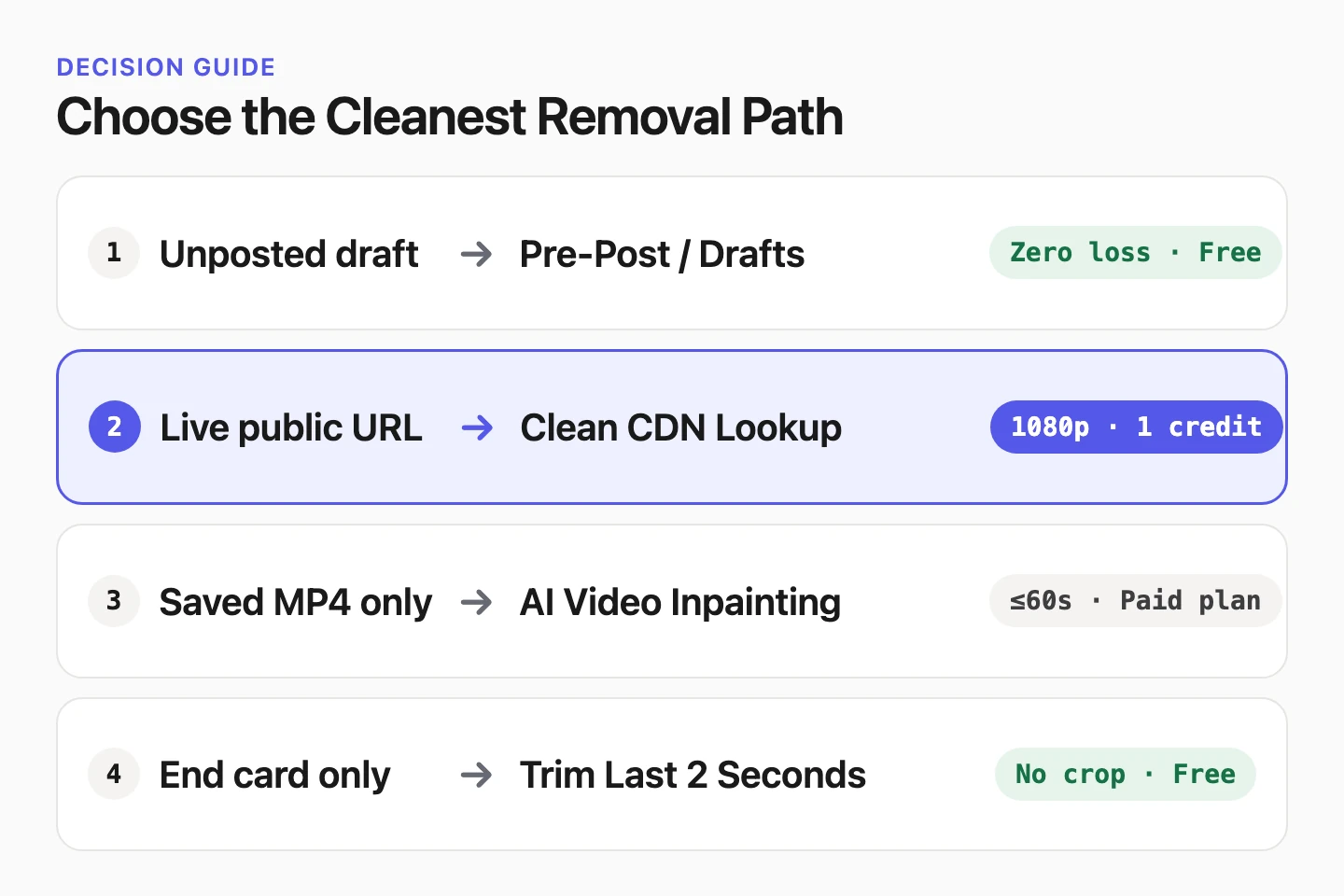
Choose the Right Method Before You Edit
Pick your workflow based on whether you still have the unposted draft, a public TikTok URL, or only a saved MP4 file. Most creators lose sharpness because they immediately zoom and crop a watermarked download when a zero-loss source stream or cleaner recovery method is still available.
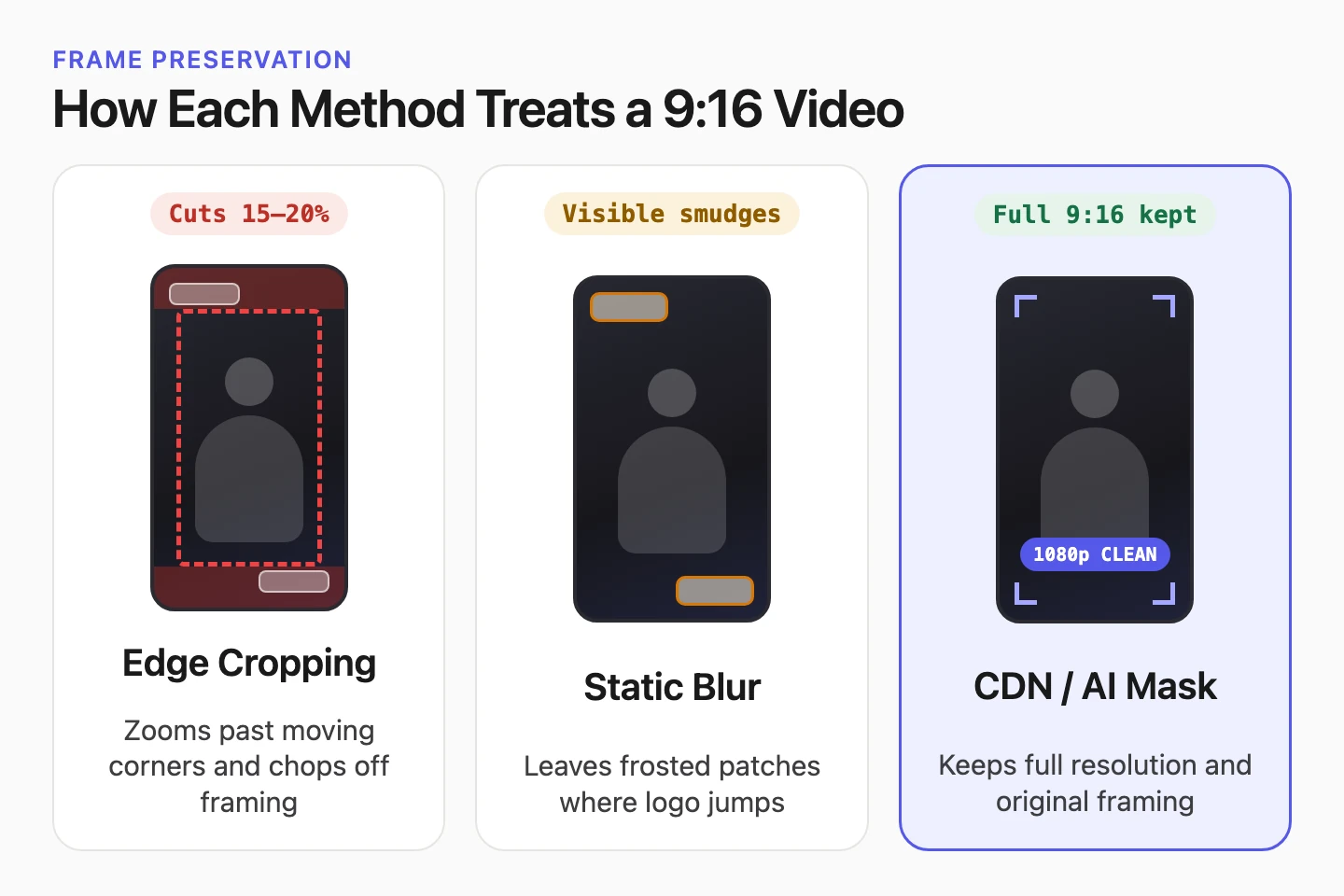
A TikTok watermark has two pieces: a semi-transparent musical note icon with the creator's @username that jumps between the upper-left and lower-right corners every few seconds, and a 2-second closing end card. Because the logo moves across the frame, static blur boxes leave visible smudges while cropping cuts into subjects and captions.
| Comparison of methods to remove TikTok watermark | Method | Starting Asset | Quality & Framing | Moving Stamp | Cost & Speed |
|---|---|---|---|---|---|
| 1. Pre-Post / Drafts | Your unposted clip | Original master export | Never added | Free, instant | |
| 2. Public Link Lookup | Live public TikTok URL | Untouched 1080p CDN MP4 | Bypassed completely | 1 credit, seconds | |
| 3. AI Video Inpainting | Saved MP4 (≤60s / 100 MB) | Original frame + feathered patch | Tracked frame by frame | Paid (10–20 credits / 13s) | |
| 4. Trim or Crop | Saved MP4 in editor | Trims tail or crops edges | Weak for moving logos | Free, 2–5 minutes |
Whenever a clip is still live and public, choose a public link lookup before uploading a watermarked file. Fetching the clean CDN stream skips re-encoding completely.
Method 1: How to Remove TikTok Watermark Before Posting
The cleanest way to know how to save a TikTok video without watermark stamps is preventing TikTok from adding one to your own footage. Two built-in habits protect your master copy before export.
Turn on Save Post Without Watermark Before Publishing
On the final publishing screen, open More options near the bottom. In TikTok app versions that offer this setting (menu wording and availability vary slightly by region and update), turn on Save to device and Save post without watermark. When you publish, TikTok saves a clean MP4 directly to your camera roll.
One caveat applies to licensed audio: if your clip uses commercial tracks licensed only inside TikTok, the clean saved copy may export muted. Original voiceovers, camera audio, and royalty-free tracks save normally with sound.
Export From TikTok Drafts or Your External Editor
If you are not ready to publish, store the edit in TikTok Drafts, open it from your profile grid, and tap the download icon on supported app versions. For creators cross-posting to Instagram Reels and YouTube Shorts every week, editing in your native camera app, CapCut, Premiere Pro, or DaVinci Resolve and exporting a master 1080p MP4 first avoids every platform watermark automatically.
Method 2: Remove TikTok Watermark From Video With a Public Link
If a post is already live and public, pulling its unwatermarked CDN stream is the fastest way to remove TikTok watermark from video clips with zero quality loss. TikTok hosts clean H.264 and ByteVC1 MP4 streams for playback and only stamps the bouncing overlay when someone taps Save video inside the app.
Copy the public post link. Tap Share and choose Copy link. Standard tiktok.com URLs, mobile vm.tiktok.com or vt.tiktok.com links, desktop /t/ links, and numeric post IDs all work.
Paste the URL into TokToolset. Open the watermark tool, paste the link, and run a 1-credit lookup using your welcome or paid credits.
Check resolution and codec. Compare the clean stream cards (1080p H.264 MP4 with AAC audio, compact 1080p ByteVC1, or 720p H.264) with pixel dimensions and file size listed upfront.
Download the clean MP4. Save the unwatermarked file immediately. Signed download links stay reusable free for 30 minutes.
Knowing how to download TikTok videos without watermark compression keeps your clips crisp for cross-posting or archiving approved campaign deliverables. Because nothing is zoomed or re-encoded, every pixel matches what TikTok serves viewers.
Run this link lookup directly in the TokToolset TikTok Watermark Remover with no TikTok login required; creators receive zero notifications. New accounts receive 10 welcome credits valid for 30 days, and each public link lookup uses 1 credit. If TikTok does not serve a clean rendition for a post, the card labels the attributed fallback stream clearly.
If you also want a dedicated page for how to download TikTok video without watermark options across formats, open the TikTok Video Downloader. Neither tool charges credits when a URL is private, deleted, or fails to resolve.
Method 3: Remove TikTok Watermark From a Saved Video (AI Inpainting)
When the original post has been deleted or you only have a previously exported MP4 on disk, you need a file-based approach to remove TikTok watermark from a saved video cleanly.
Modern AI video inpainting differs sharply from basic blur tools. Instead of smearing a fixed rectangle, a detector tracks the official moving watermark and @username across vertical or horizontal frames and reconstructs the background behind the stamp using neighboring frame context.
On TokToolset's upload lane, paid accounts (unlocked with any credit pack or subscription on the pricing page) can upload a saved MP4 up to 100 MB and 60 seconds. Before AI processing starts, the worker scans for an official TikTok logo; if none is found, the job stops and charges zero credits. Clips run in 13-second segments at 15 fps, with an optional Extra smoothing pass for busy moving backgrounds.
Only the repaired logo mask is feathered back onto your original full-resolution video alongside 160 kbps AAC audio, leaving the rest of the picture untouched. Standard processing costs 10 credits per 13-second segment (or 20 credits per segment with Extra smoothing), shows the upfront maximum cost before you confirm, and auto-refunds failed tasks. Uploaded files sit in private encrypted storage, delete after completion, and auto-purge within 24 hours.
Method 4: Trim the End Card or Crop in a Free Editor
If you want a free offline way to remove watermark from TikTok video backups and accept minor limits, two manual edits remain useful:
- Trimming the end card: TikTok's 2-second outro sits cleanly at the tail of exported files. Open the clip in Apple Photos, Google Photos, CapCut, or iMovie, trim the last 2 seconds, and export with zero frame loss on the main video.
- Selective cropping: Cropping works only when the subject stays centered and you can spare 15–20% of the vertical frame height and width to eliminate both moving corners. Covering the corner with a caption bar or logo requires keyframing every time the stamp jumps sides.
Skip static blur filters: a frosted box jumping around a vertical clip looks more distracting than the original stamp.
How to Remove TikTok Watermark on iPhone, Android, and PC
Over 80% of TikTok watermark searches happen on mobile devices, and each operating system places browser downloads in a different folder. Use the save path below so your clean MP4 lands where your editor can find it.

iPhone and iPad (Safari)
- Tap Share › Copy link on the public clip inside TikTok.
- Open Safari, paste the link into TokToolset, and run the 1-credit lookup (or upload a saved MP4 on a paid plan).
- Tap Download on the 1080p H.264 clean stream card and confirm in Safari.
- Tap Safari's downward download arrow, open the MP4 in Files › Downloads, and tap Share › Save Video to move it into Apple Photos.
Android Phones and Tablets (Chrome)
- Copy the public video link via Share › Copy link in TikTok.
- Paste the link into Chrome on TokToolset and submit.
- Check the resolution and file size, then tap Download.
- Chrome saves the MP4 straight to Internal storage › Download, making it visible immediately in Gallery and Google Photos.
Windows PC and Mac Browsers
If you need how to download TikTok videos on PC without watermark friction before editing, open the video on tiktok.com, copy the address bar URL, and paste it into TokToolset. Choose H.264 MP4 (more reliable than ByteVC1/HEVC on older Windows PCs) and click Download. Files drop straight into your Downloads folder ready for Premiere Pro, DaVinci Resolve, Final Cut Pro, or CapCut Desktop.
What Watermark Removers Cannot Erase (and Copyright Rules)
Understanding technical boundaries prevents wasted credits and frustrating edits. Neither clean CDN extraction nor TikTok-specific detection removes graphics flattened permanently into the video frames before upload.
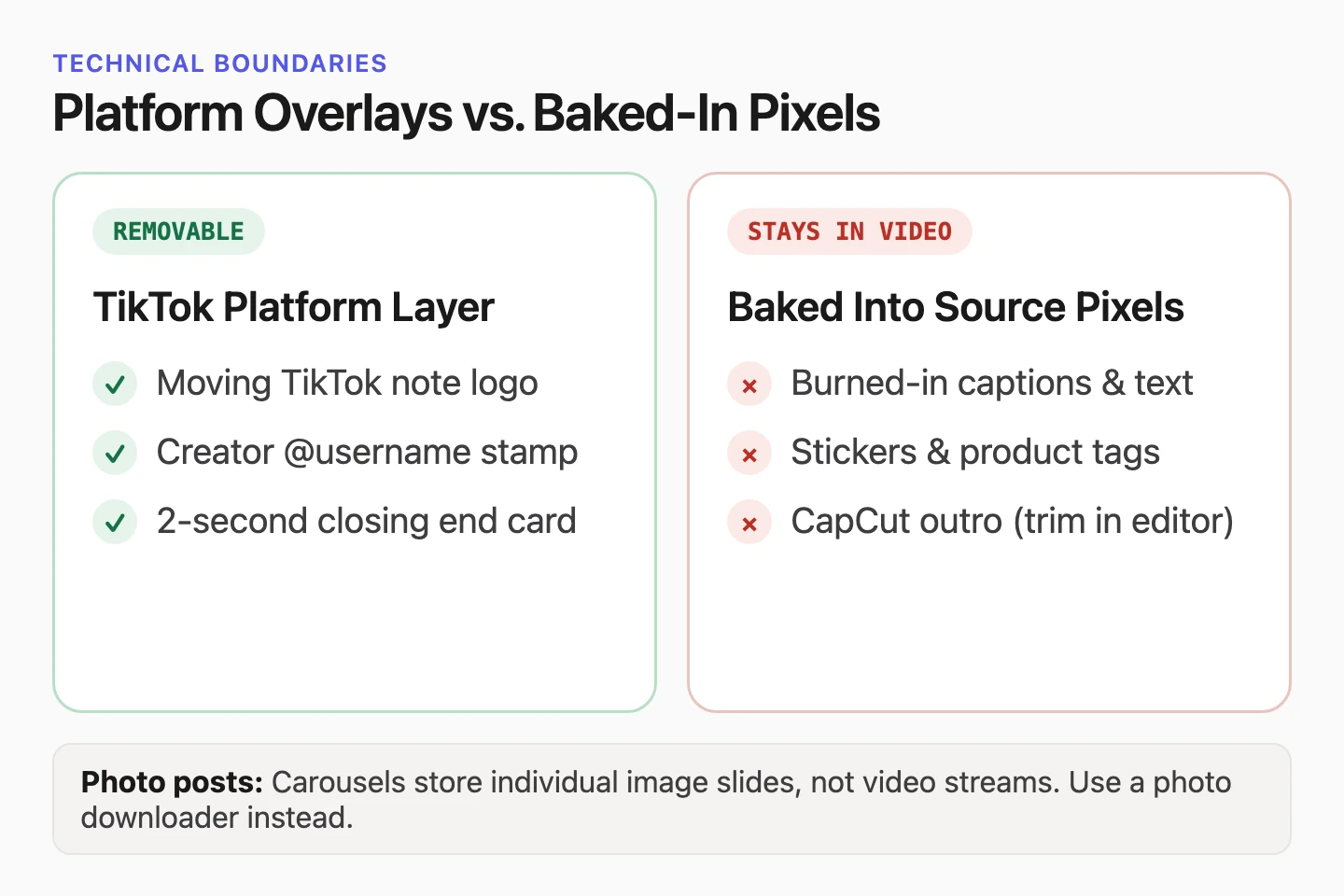
Watch for three common edge cases:
- Burned-in captions and stickers: Users looking up how to download TikTok video without watermark and text often expect subtitles to vanish. On-screen text, stickers, and product tags baked into the pixels before publishing remain part of the clean source stream.
- CapCut ending screens: If you are figuring out how to remove CapCut watermark on TikTok clips, remember CapCut appends its logo as a separate tail clip. Cut that 2-second outro in your editor, or turn off CapCut's default ending in Settings before exporting.
- Photo carousels and slideshows: Multi-image posts do not use a single video stream. To handle how to remove TikTok watermark from photo posts, paste the URL into the TikTok Photo Downloader for clean JPG or PNG slides, or use the TikTok Slideshow Downloader to render a clean MP4 with sound.
Frequently Asked Questions
How to remove TikTok watermark when you download a video?
Copy the public video's Share link in TikTok, paste it into a link-based watermark remover such as TokToolset, and choose a clean 1080p or 720p H.264 stream card. Because the server fetches TikTok's unwatermarked CDN file before the app stamps an overlay, you save a sharp MP4 in seconds.
How do I remove the TikTok watermark from a photo or slideshow?
TikTok photo posts store individual image slides separately from standard video streams. Copy the carousel's public URL and paste it into the TokToolset TikTok Photo Downloader to save clean, full-resolution JPG or PNG slides without overlays, or use the Slideshow Downloader to export a clean MP4 with audio.
How to remove TikTok watermark from a saved video without a link?
When only a watermarked MP4 remains on your device, upload it to an AI video inpainting tool that tracks the moving TikTok logo and username across frames. On TokToolset, paid accounts can clean saved MP4 files up to 100 MB and 60 seconds without cropping or leaving static blur.
Does removing a TikTok watermark reduce video quality?
Pulling a clean CDN stream from a public link causes zero quality loss because the MP4 is never cropped or re-encoded. For uploaded MP4s, feathered AI inpainting replaces only the tracked logo zone and composites it onto your original full-resolution frame, avoiding the heavy softness caused by cropping.
Can a watermark remover erase burned-in captions or a CapCut ending?
No. Clean CDN streams omit only TikTok's platform-applied logo and username stamp, and TikTok watermark detectors target official moving platform overlays. Subtitles, stickers, or third-party CapCut ending screens baked into the source pixels remain visible and must be trimmed in a video editor or exported cleanly from drafts.
Is it legal to save someone else's TikTok video without a watermark?
Saving your own videos for cross-posting or archiving public clips for private offline reference is generally fine, whereas downloading and republishing someone else's TikTok video without permission can violate copyright law and platform rules. Always request written consent and credit the original creator before sharing or monetizing third-party footage.
Ready to clean your next clip without blurry patches or cropped edges? Paste any public TikTok link to save a clean 1080p MP4 with your 10 welcome credits, or unlock frame-tracked AI removal for saved MP4s up to 60 seconds: see how to remove TikTok watermark cleanly with TokToolset right in your browser.