How to Download TikTok Videos on PC: 4 Ways
Learn how to download TikTok videos on PC using four methods: built-in browser saving, watermark-free HD MP4, bulk ZIP downloads, and 192 kbps MP3 audio.

To save a TikTok clip on desktop, right-click the player on tiktok.com and choose Download video for a quick watermarked file, or paste the public URL into a browser downloader for a clean MP4 with visible resolution and file size. This guide covers how to download TikTok videos on PC using four practical workflows on Windows 11, Windows 10, and macOS. Whether you want to know how to save TikTok videos on PC for offline study, collect approved edits, bundle up to 30 profile clips into one ZIP, or extract audio, every method runs in your browser without risky extensions.
Quick Comparison: 4 Ways to Download TikTok Videos on PC
Your best desktop method depends on whether you need a clean stream, multiple clips at once, or a backup of your own posts. A tiktok video download pc search returns dozens of ad-heavy sites and add-ons, yet four methods cover nearly every real workflow.
| Comparison of PC TikTok download methods | TikTok.com Right-Click | Browser Tool (TokToolset) | Bulk Profile ZIP | Creator Data Export |
|---|---|---|---|---|
| Watermark | Bouncing logo and @handle | Clean MP4 first when served | Clean MP4s when served | Original upload or URL list |
| If Save is off | Menu option disappears | Works on public posts | Works on public profiles | Own account only |
| Quality & format | Default file, hidden specs | Up to 1080p, H.264/ByteVC1 | Up to 30 MP4s per ZIP | Depends on export type |
| TikTok login | Optional for public pages | None required | None required | Account owner login |
| Best for | Quick clip, watermark fine | Clean HD MP4 or MP3 | Archiving a public profile | Backing up your own posts |
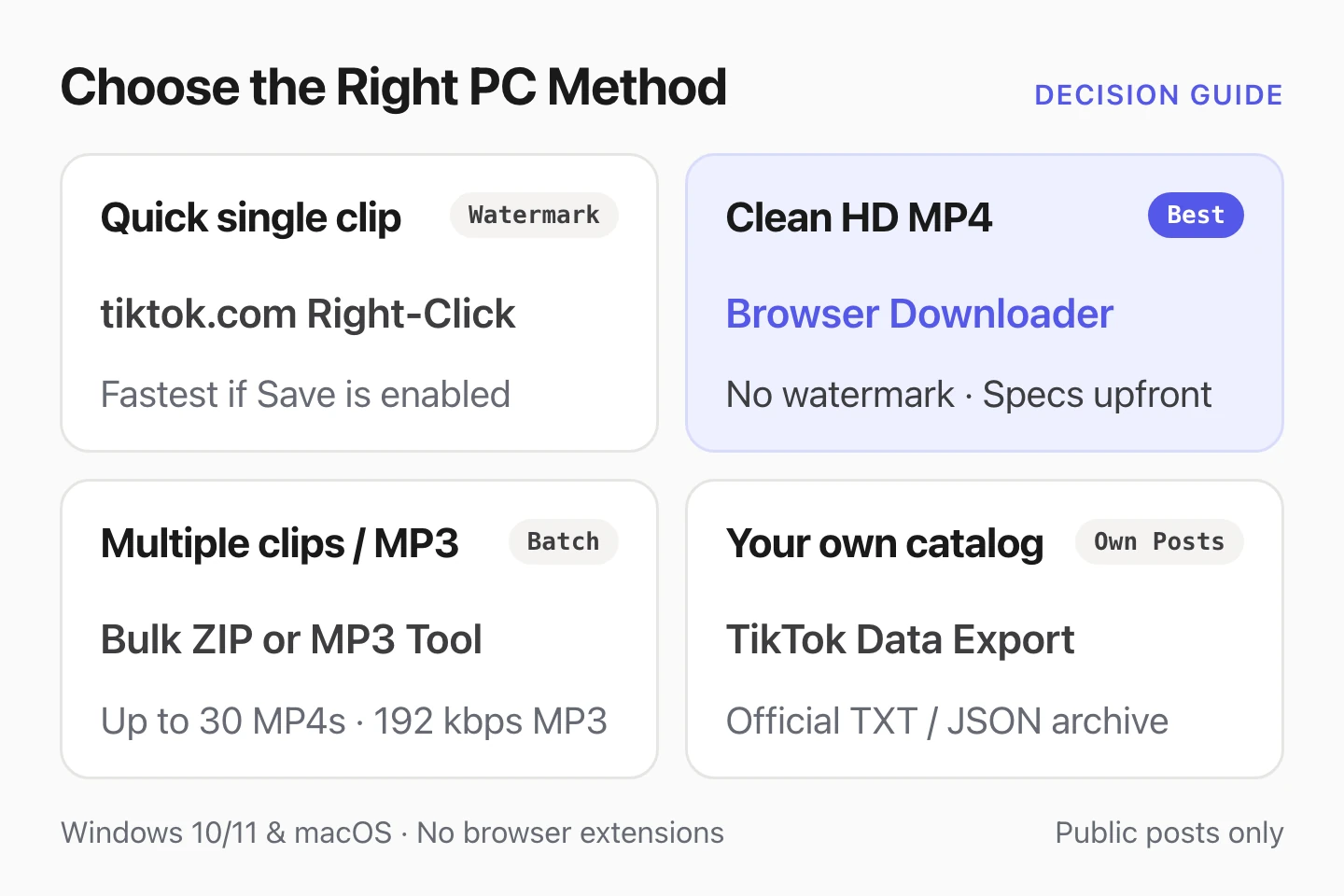
One hard boundary applies across every legitimate tool: external downloaders only access public posts. Private accounts, friends-only clips, and deleted videos cannot be fetched from TikTok's public servers.
Method 1: Save Directly From TikTok.com on Windows or Mac
When the creator keeps downloads enabled and a watermark is acceptable, the quickest way to download a TikTok video on PC uses TikTok's desktop site in Chrome, Edge, Firefox, or Safari.
Open the post on tiktok.com. Load the public video in your desktop browser and pause playback.
Open the video menu. Right-click the player on Windows, or Control-click (two-finger tap) on Mac.
Select Download video. Your browser saves the MP4 straight into your default Downloads folder.
Confirm playback. Press Ctrl+J on Windows or Cmd+Option+L in Safari to locate and test the file.
This built-in option works well if you just want to learn how to download TikTok videos for casual offline viewing, but it hits two practical limits:
- Watermarked copy: TikTok stamps its bouncing logo and @username onto the exported file, which can block lower-third details and slightly soften the picture.
- Hidden menu option: If a creator turns off downloads in privacy settings, Download video vanishes from the right-click menu even though the video stays publicly viewable.
Method 2: How to Download TikTok Videos on PC Without Watermark
To save a clean MP4 without TikTok's bouncing overlay and check pixel height, codec, and file size beforehand, use a browser-based tiktok video downloader for pc that reads the clean stream TikTok serves to web players. No TikTok login, desktop installer, or browser extension is needed.
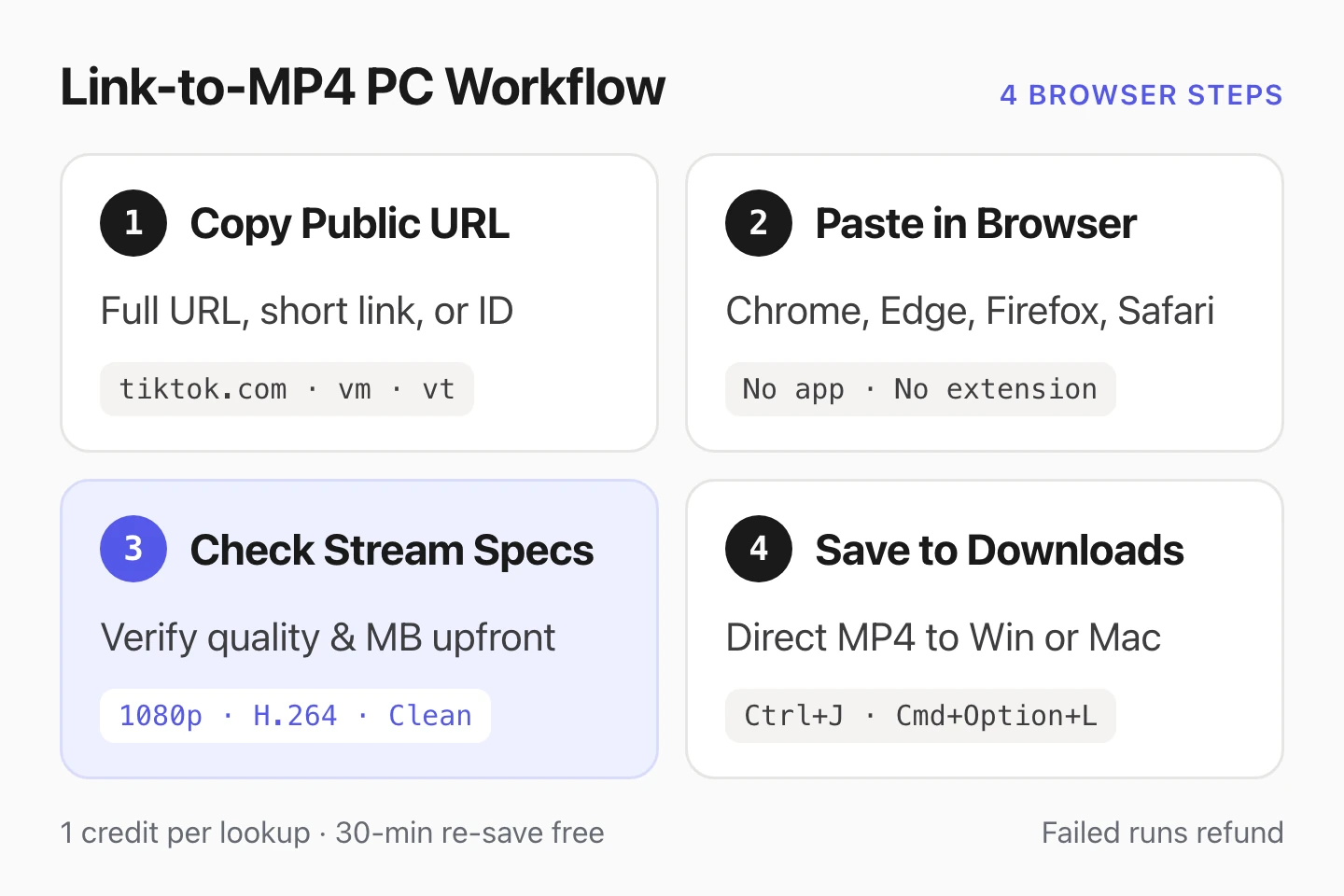
On TokToolset's TikTok Downloader, every public post follows four steps in Chrome, Edge, Firefox, or Safari.
Copy the public post link. Copy the URL from tiktok.com or click Share and Copy link. Full video URLs, vm.tiktok.com or vt.tiktok.com share links, /t/ short links, and bare numeric post IDs all work.
Paste the link into TokToolset. Submit the URL and sign in to a free TokToolset account. New accounts get 10 welcome credits valid for 30 days with no payment card or TikTok login required.
Compare resolution, codec, and size. A 1-credit lookup loads an inline preview and every stream TikTok serves. Clean unwatermarked streams appear first with resolution (1080p, 720p, or 540p), codec (H.264 or ByteVC1), and megabytes.
Download the MP4 to your PC. Click Download Video to save locally. Switching quality or re-saving within 30 minutes uses 0 extra credits, and failed or private lookups refund automatically.
For single clips only, you can also open the TikTok Video Downloader directly. Because a download tiktok video pc lookup fetches TikTok's clean stream rather than blurring over pixels, video sharpness stays intact. Captions, stickers, and handles edited into the footage before upload remain part of the image pixels in every copy. If you already hold a saved MP4 with a watermark, the TikTok Watermark Remover offers link lookups plus AI removal for uploaded MP4s up to 100 MB and 60 seconds after your first credit purchase.
Knowing how to download TikTok videos without watermark also helps when a link points to a photo carousel instead of a video. TokToolset detects photo posts automatically and lets you switch to individual slides or a 1080 × 1920 slideshow MP4 with music.
Method 3: Bulk Download Videos or Extract MP3 Audio on PC
Desktop browsers shine on two heavier jobs that feel clumsy on mobile: saving a batch of profile clips and pulling clean standalone audio tracks.
Download Multiple Videos From a Public Profile as One ZIP
Pasting twenty URLs individually is slow and leaves cluttered filenames. If you are archiving approved campaign deliverables or figuring out how to download all the videos from a TikTok profile without command-line tools, open the TikTok Bulk Downloader.
Enter any public @username or profile URL to load the video grid, then pick clips or click Select all to bundle up to 30 videos into one numbered ZIP archive. The credit estimate displays before you start, and the finished ZIP extracts natively in Windows File Explorer or macOS Finder.
Save a TikTok Video on PC and Convert It to 192 kbps MP3
When you only need spoken narration, an interview quote, or background audio for Audacity or Premiere Pro, many users look up how to download TikTok videos on PC and make it MP3.
In TikTok to MP3, paste the public post link and choose either the post's attached original sound or the full video audio track. Conversion produces a 192 kbps stereo MP3 at 44.1 kHz for 1 credit and saves directly to your browser without local freeware converters.
Method 4: Back Up Your Own TikTok Videos on a Laptop or Desktop
Creators often need a reliable way to preserve their own catalog before replacing a phone or cleaning drafts. Knowing how to download a TikTok video on laptop from your own profile keeps clean master copies ready for editing:
- Save clean copies as you post: On the TikTok app posting screen, open More options and turn on Save to device and Save post without watermark, then sync files to your computer via AirDrop, iCloud, OneDrive, or USB.
- Export your TikTok account archive: On desktop tiktok.com, open Settings › Privacy › Download your data and request a TXT or JSON archive. TikTok delivers a record of your post history and links within a few days, which you can pair with browser lookups to recover clean H.264 MP4s for older posts whose raw footage is gone.
Video Quality, Codecs, and Where PC Downloads Are Saved
Two complaints appear repeatedly in desktop support threads: clips looking softer than promised "4K" buttons, and MP4 files playing with audio only and a black screen on Windows. Both come down to source limits and codecs.
H.264 MP4 vs ByteVC1 (HEVC): Which Codec Works Best on PC?
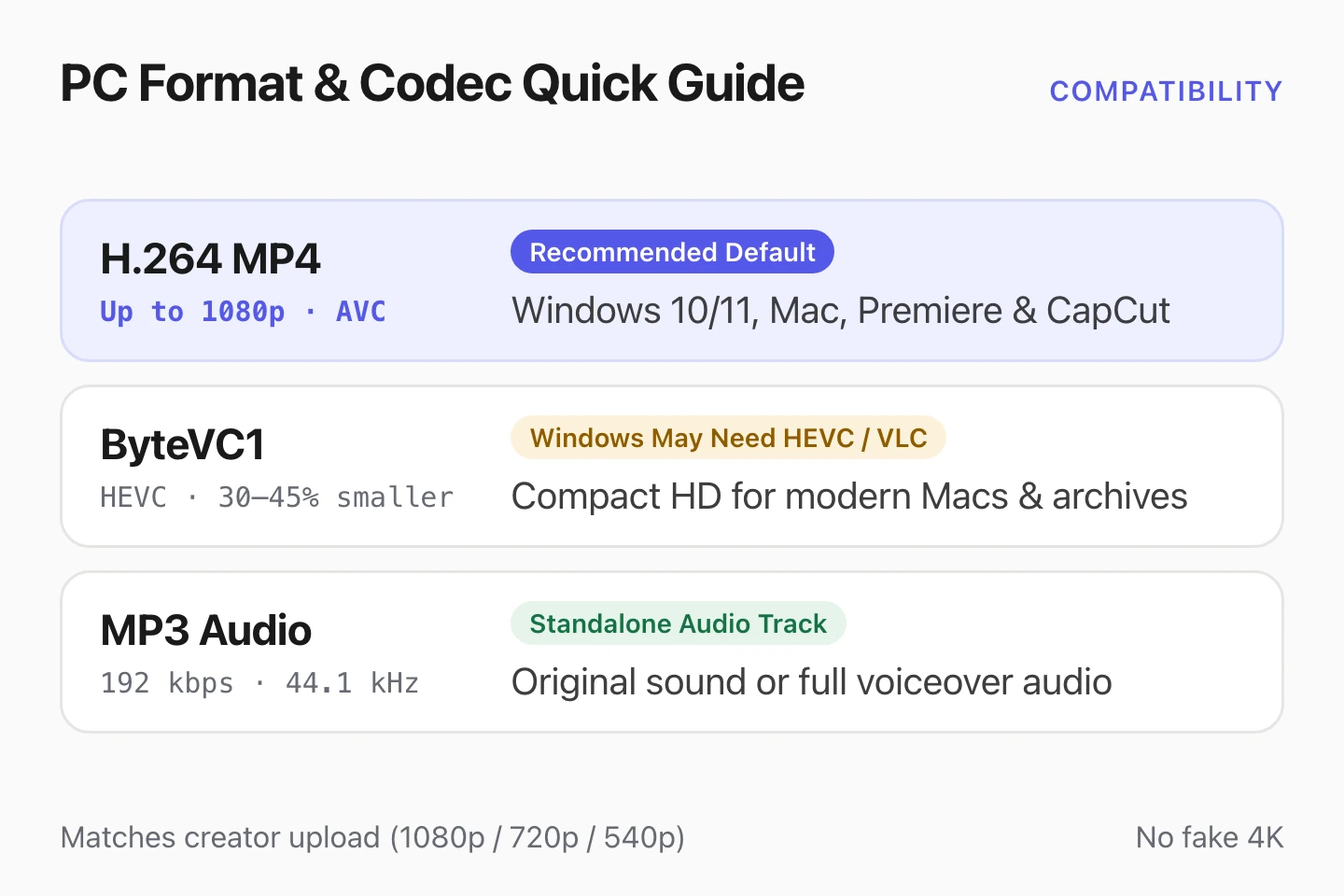
TikTok stores each post at the resolution the creator uploaded: usually 1080 × 1920 (1080p), 720 × 1280 (720p), or 540 × 960 (540p). No honest tool can turn a 720p upload into real 4K; sites promising "4K" either relabel 1080p streams or bloat file sizes with artificial upscaling.
Choosing the right codec matters far more on desktop:
- H.264 (AVC) MP4: Best default for Windows 11, Windows 10, macOS, PowerPoint, CapCut, Premiere Pro, and DaVinci Resolve. Plays immediately without extra plugins.
- ByteVC1 (HEVC): Keeps matching clarity in roughly 30–45% fewer megabytes, ideal for modern Macs and tight storage. Some Windows 10 and Windows 11 setups lack Microsoft's HEVC Video Extensions by default, causing a black screen in built-in players unless you use VLC or pick H.264 instead.
Default Download Folders on Windows 11, Windows 10, and macOS
When you download TikTok video to computer in any major browser, files save to your system download directory unless you changed browser preferences:
- Windows 11 and Windows 10:
C:\Users\<YourName>\Downloads(pressCtrl + Jin Chrome, Edge, or Firefox, then click Show in folder). - macOS:
/Users/<YourName>/Downloads(open Finder › Downloads, or pressCmd + Option + Lin Safari andCmd + Shift + Jin Chrome). - ZIP archives: Right-click and choose Extract All on Windows, or double-click in macOS Finder to unpack numbered MP4s.
Safety, Copyright, and Fixing Common PC Download Issues
Desktop download queries attract aggressive ad networks and over-privileged extensions. Keep three guardrails in mind on any PC:
- Avoid broad-access Chrome extensions: Extensions asking to "read and change all your data on all websites" expose browsing sessions and cookies across unrelated tabs.
- Reject installer downloads: Real video saves end in
.mp4,.mp3, or.zip. Close any page that prompts an.exe,.msi, or.dmgfile. - Verify retention rules: TokToolset streams instant MP4, MP3, and browser-built ZIP files via 30-minute encrypted tickets without keeping permanent video copies. Background tasks (rendered slideshows or uploaded watermark jobs) stay in Settings › Tasks for 7 days before automatic deletion.
Quick fixes for common desktop errors:
- No Download video on right-click: The creator disabled native saves. Copy the URL and run a browser lookup instead.
- Private or friends-only post: Users often search how to download private TikTok videos, yet external tools cannot bypass privacy locks. TokToolset stops cleanly at 0 credits.
- Removed video: Guides on how to download deleted TikTok videos cannot recover erased CDN files. Check the URL in a signed-out tab first; missing posts cost 0 credits.
- Expired download button: Security tickets expire after 30 minutes. Paste the link again to generate a fresh link, and check pricing only if you need packs beyond your 10 welcome credits.
Frequently Asked Questions
Can you download videos from TikTok on PC without an app or extension?
Yes. You can save directly in Chrome, Edge, Firefox, or Safari without installing desktop software or browser add-ons. Right-click a public video on tiktok.com for a watermarked copy when downloads are enabled, or paste the video URL into a browser downloader to save a clean MP4 straight to Downloads.
How to download TikTok videos with no download option on PC?
When a creator disables the built-in Save option, right-clicking on tiktok.com hides Download video. Copy the public post URL from your browser address bar, paste it into a browser-based downloader, inspect the clean stream, and save the MP4. Respect the creator's preference and ask permission before reposting.
How do I download TikTok videos to my files on Windows or Mac?
Every browser-saved TikTok MP4 goes straight into your system Downloads folder by default. On Windows 11 or Windows 10, open File Explorer and check Downloads or press Ctrl+J in your browser. On macOS, open Finder and choose Downloads, or press Cmd+Option+L in Safari to locate the saved video.
How to download TikTok videos on PC without watermark in 1080p?
Copy the public video link from tiktok.com, paste it into TokToolset, and choose the top unwatermarked H.264 MP4 stream. Output reaches 1080p whenever the creator uploaded in Full HD; if the source clip was exported at 720p or 540p, TokToolset shows real dimensions upfront instead of faking 4K.
Can you download private or deleted TikTok videos on a computer?
No. External desktop tools only access public content that TikTok serves to signed-out visitors. Private accounts, friends-only clips, age-restricted posts, and deleted videos cannot be retrieved from TikTok's CDN once restricted or removed. On TokToolset, lookups that hit a private or missing post automatically cost zero credits.
Does TikTok notify the creator when you save a video on PC?
No. TikTok does not send download alerts to creators when you save a public clip on desktop. When you use TokToolset, lookups run through our servers without connecting your personal TikTok account or passing browser cookies, so zero profile visits or download notifications appear on the creator's activity log.
Ready to skip bouncing watermarks, fake 4K buttons, and risky browser extensions? Open our all-in-one tool for how to download TikTok videos on PC to preview exact resolutions, codecs, and file sizes upfront. New TokToolset accounts start with 10 welcome credits valid for 30 days, with automatic refunds on failed lookups.