How to Download TikTok Videos on Any Device
Learn how to download TikTok videos on iPhone, Android, PC, and Mac, with or without a watermark, plus clear fixes when the Save button is disabled.

You can save public TikTok clips in three ways: tap Share > Save video in the mobile app when the creator allows it, right-click the web player on tiktok.com from a computer, or paste a public link into TokToolset's TikTok Downloader to preview resolutions and download a clean MP4 without the bouncing watermark. This guide shows how to download TikTok videos on iPhone, Android, Windows PC, and Mac, compares H.264 and ByteVC1 quality, explains TikTok's offline cache, and solves missing Save buttons, private accounts, and deleted links.
Which Method Should You Use to Download TikTok Videos?
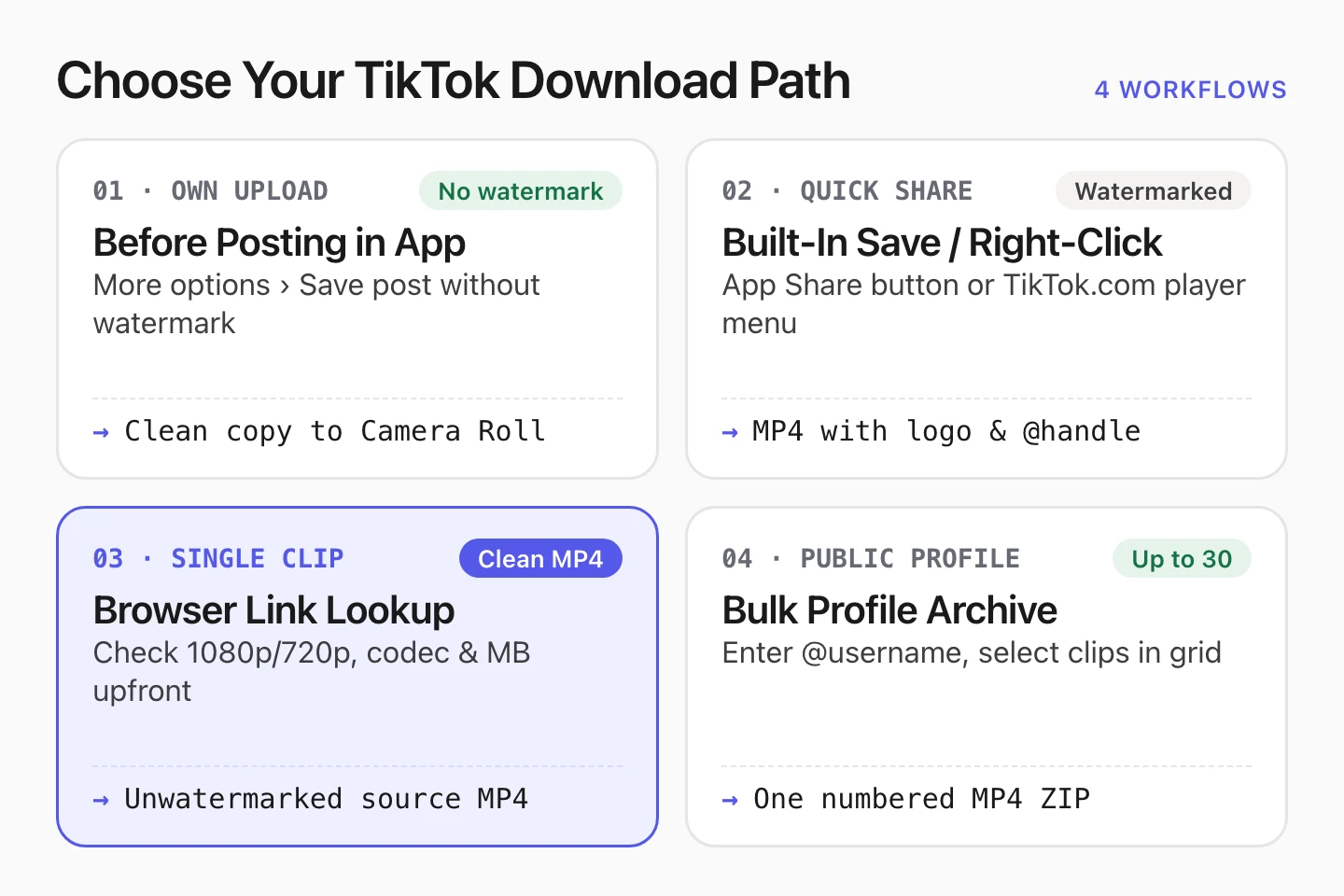
Choose your method based on three practical checks: whether you need a standalone MP4 file, whether a floating logo interferes with your edit, and whether the creator enabled TikTok's Save button. The in-app button is quickest for casual sharing, while a browser lookup reveals resolution, codec, and file size upfront with no TikTok login.
| Comparison of TikTok video download methods | TikTok App Save | Desktop Right-Click | TikTok Offline Videos | Browser Downloader (TokToolset) | Bulk Profile ZIP |
|---|---|---|---|---|---|
| Watermark | Bouncing logo and @handle | Logo and @handle | In-app playback only | Clean stream first when served | Clean stream preferred |
| Works if Save is off | No | Usually no | For You feed only | Public links (respect rights) | Public profiles only |
| Standalone MP4 | Yes (Photos / Gallery) | Yes (Downloads) | No (app cache only) | Yes (up to 1080p MP4) | Yes (up to 30 MP4s) |
| Specs upfront | No | No | Preset batch size | Resolution, codec, MB | Count and credit cost |
| Best for | Casual mobile sharing | One-off PC saves | Flights and commutes | Clean clips and editing | Public profile archives |
Saving TikTok Videos on iPhone and Android
On mobile, you can save clips straight from the TikTok app when enabled or run a browser lookup in Safari or Chrome for clean files with upfront size specs.
Save Directly Inside the TikTok App
To learn how to download videos on TikTok using the built-in mobile button, follow the same four taps on iPhone and Android. Exported clips carry TikTok's bouncing watermark and @username, and the option only appears if the creator allows downloads.
Open the public post. Play the clip you want to keep in the TikTok mobile app.
Tap Share. Press the curved arrow on the right, or press and hold the video.
Tap Save video. Wait for the progress ring to finish exporting the watermarked file.
Open Photos or Gallery. Confirm the saved clip appears in your phone's local camera roll.
Knowing how to download TikTok video clips inside the app works well for quick reference. When Save video is missing or grayed out, the creator disabled in-app saving or the post is a Photo Mode carousel.
How to Download TikTok Videos on iPhone (Safari) and Android (Chrome)
When you want an unwatermarked MP4 or want to check megabytes before saving on mobile data, use Safari or Chrome with zero app installs. Standard tiktok.com URLs, vm.tiktok.com and vt.tiktok.com share links, and numeric post IDs all work.
- Tap Share > Copy link on any public post in TikTok.
- Open TokToolset's TikTok Downloader in Safari (iOS) or Chrome (Android).
- Paste the link and run a 1-credit lookup (new accounts include 10 welcome credits valid for 30 days, with no TikTok login).
- Check resolution, codec, and file size, then tap Download Video.
Default mobile folders differ by platform:
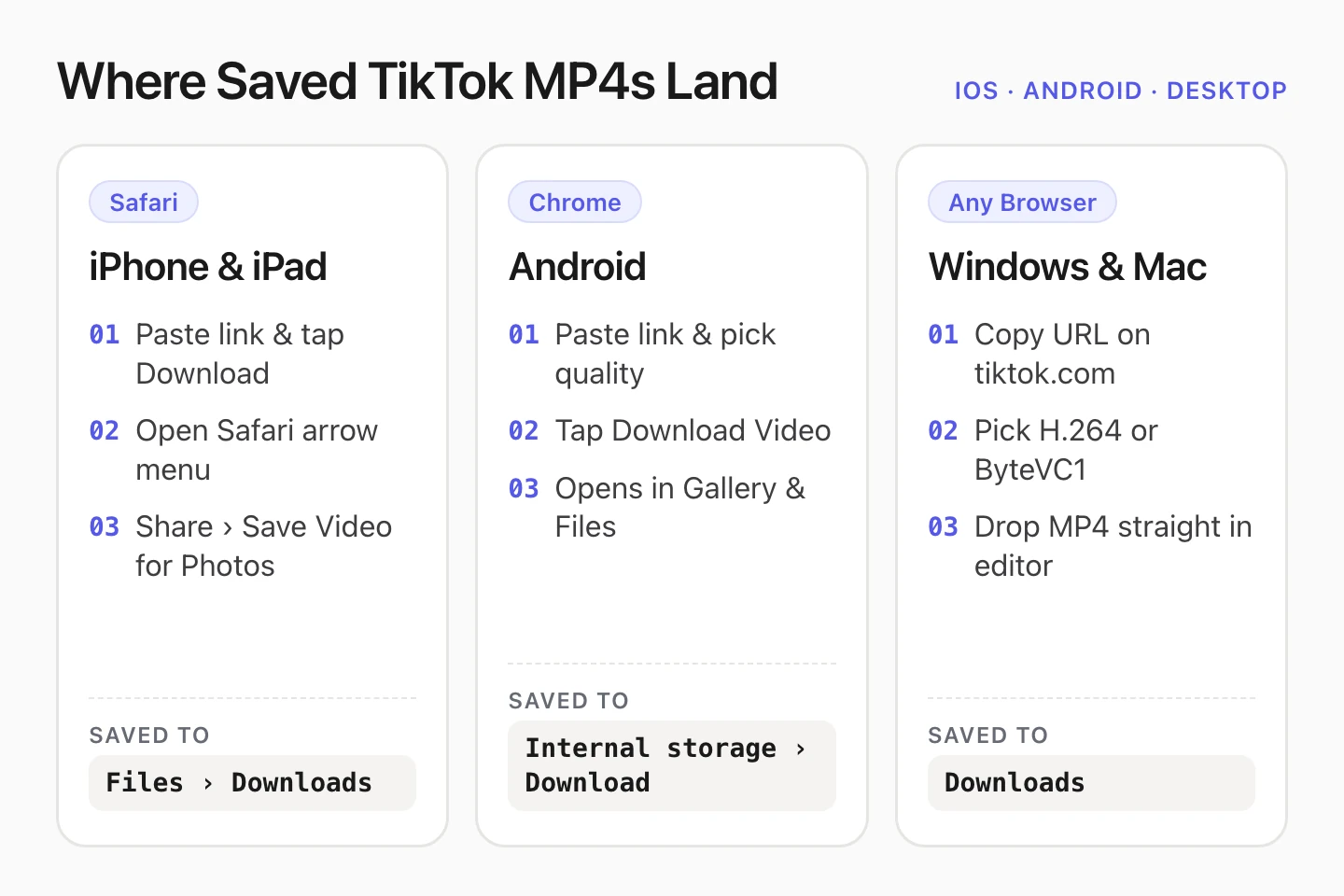
- iPhone and iPad (Safari): Files land in
Files > Downloads. Tap the blue download icon in Safari's address bar, open the MP4 in Files, and tap Share > Save Video to copy it to Photos. - Android (Chrome): Files save directly to
Internal storage > Downloadand appear immediately in My Files, Files by Google, and your gallery.
How to Download TikTok Videos on PC and Mac
Desktop workflows matter when you are checking how to save TikTok videos on laptop systems running Windows or looking up how to download videos from TikTok on Mac for editing or presentations. Both desktop options below run cleanly inside your browser without extensions.
Direct Right-Click Download on the TikTok Website
When a creator leaves downloads enabled, tiktok.com supports quick right-click saving in Chrome, Edge, Safari, and Firefox:
- Open the public video page on
tiktok.com. - Right-click the video player (Control-click on Mac).
- Click Download video or Save video as, then choose your folder.
TikTok also offers an official web downloader page, though its notice explicitly states that TikTok does not support watermark-free downloads of other users' posts. Both native desktop options hide resolution and codec details before saving and fail when the creator turns off downloads.
How to Download TikTok Videos on PC Without Watermark in a Browser
For clean local MP4 files with visible technical specs, run a browser lookup directly on Windows or macOS:
- Copy the video URL from
tiktok.com(full URLs,/t/desktop short links,vm/vtshare links, and numeric post IDs all work). - Open TikTok Video Downloader or the TikTok Downloader hub.
- Paste the link and sign in to your free TokToolset account for a 1-credit lookup.
- Preview the clip inline, pick
1080p,720p, or540pinH.264orByteVC1, and click Download Video.
Both Windows and Mac browsers save the MP4 directly into your Downloads folder. Encrypted media tickets stay active for 30 minutes, so switching resolutions or re-downloading the same post within that window costs 0 extra credits, and TokToolset stores no permanent copy of downloaded videos on its servers.
How to Download TikTok Videos Without Watermark and Keep Source Quality
Clean files are the main reason creators and editors look past TikTok's built-in Save button. Understanding how watermarks and video codecs work keeps you from wasting time on blurry re-encodes or fake 4K claims.
Save Your Own Videos Cleanly Before Publishing
If you are checking how to download your TikTok videos cleanly right as you post them, use TikTok's native creator toggle:
- Finish editing your clip and open the Post screen in TikTok.
- Tap More options below the caption field.
- Turn on Save to device and Save post without watermark (where supported in your app version).
- Publish the clip to write a clean copy directly to your camera roll.
If you lost raw footage from an older published post, either request your account data archive in TikTok privacy settings or fetch your public link through a browser lookup.
Clean Source Streams vs Burned-In Captions and Saved Files
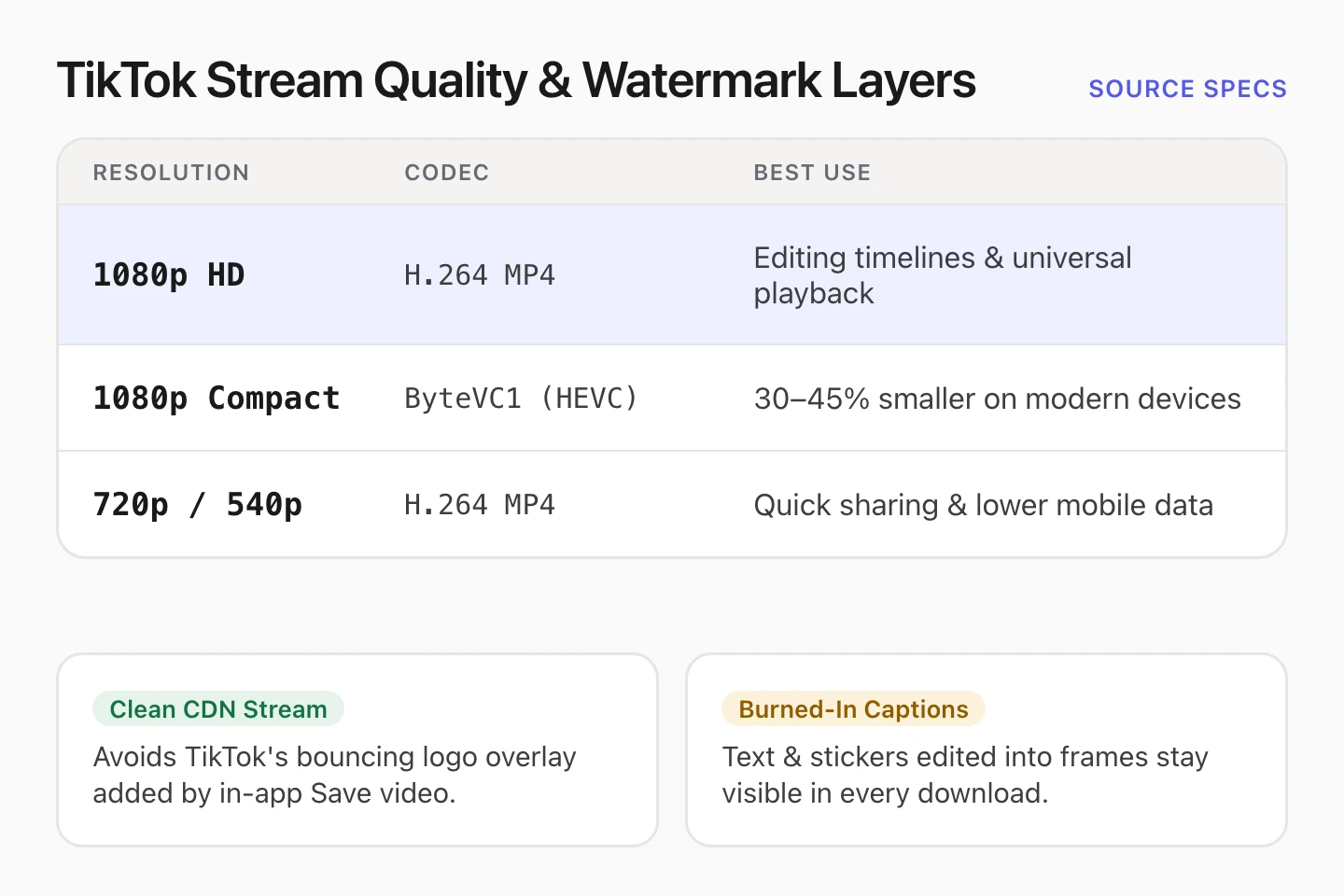
When you save TikTok video without watermark overlays via a browser lookup, the tool does not crop or blur the picture. TikTok's app Save button exports a re-encoded copy stamped with the bouncing logo, whereas TikTok's CDN also serves an unwatermarked playback stream to web players. Inspecting public post metadata puts that clean MP4 first whenever available.
Keep two boundaries in mind:
- Burned-in overlays remain: Captions, stickers, and handles edited into the footage before upload are part of the pixels and stay in every download.
- Already-saved watermarked files: If you only have an older MP4 on disk and the link is gone, use TikTok Watermark Remover to run AI watermark removal on your own file (up to 100 MB and 60 seconds; AI removal unlocks after your first credit pack or subscription, with output held in
Settings > Tasksfor 7 days).
Resolution and Codecs Explained (1080p, 720p, H.264 vs ByteVC1)
Whatever resolution the creator uploaded (1080p, 720p, or 540p) is the real ceiling. Stretching a 720p upload into 4K only inflates file size without restoring lost detail.
- H.264 MP4: Universal compatibility across browsers, PowerPoint, Keynote, Premiere Pro, Final Cut Pro, and CapCut with zero transcoding.
- ByteVC1 (HEVC): Matching sharpness in roughly 30–45% fewer megabytes on modern Apple, Windows, and Android devices.
Offline Viewing, Bulk Profile Downloads, Audio, and Photo Carousels
Different tasks call for different outputs, whether you are caching clips for a flight, archiving a profile, pulling audio, or saving swipeable photo slides.
Offline Viewing Inside TikTok vs Local MP4 Files
Travelers searching how to download offline videos on TikTok can use TikTok's built-in Offline videos cache under Profile > Menu > Settings and privacy > Offline videos. It stores 50–200 For You clips over Wi-Fi inside the app, which works nicely on airplanes, though you cannot select specific URLs or export MP4 files to your device storage. Use a browser download whenever you need standalone files on disk.
Saving Multiple Clips, Audio Tracks, and Photo Slides
- Multiple clips from one profile: To handle how to download all the videos from a TikTok profile without pasting URLs individually, enter a public
@usernamein TikTok Bulk Downloader. Signed-in accounts can select up to 30 public videos and save them in one numbered store-only ZIP archive; Photo Mode carousels are skipped at 0 credits. - Audio only: Open TikTok to MP3 to save the original sound or full video audio as a 192 kbps stereo MP3 at 44.1 kHz (1 credit lookup plus 1 credit conversion).
- Photo carousels: Swipeable photo posts are image sets, not video streams. Use TikTok Photo Downloader to save full-resolution JPG or PNG slides, grab a ZIP of every slide, or render a
1080 x 1920MP4 slideshow with sound.
Why You Can't Download Some TikTok Videos (Limits, Fixes & Copyright)
Failed downloads usually come from creator privacy settings, removed media, or link mismatches rather than browser bugs.
- Missing Save button: Users often search how to download TikTok videos without the download option when Save video disappears. Creators can disable downloads per account or post, and restricted audio also hides the button. Treat a hidden button as a clear signal of the creator's preference and ask before reusing their clip.
- Private or friends-only accounts: Claims about how to download private TikTok videos outside the app are unreliable. Honest web tools only read publicly exposed posts; private, friends-only, age-gated, and region-locked clips stop cleanly at 0 credit cost on TokToolset.
- Deleted posts: Guides promising how to download deleted TikTok videos cannot recover files erased from TikTok's CDN. Test whether the URL loads in a logged-out tab first; missing posts use 0 credits.
- LIVE broadcasts and profile links: Active LIVE streams cannot save as post MP4s, and bare
@usernamehandles belong in profile tabs such as Story, PFP, or Bulk.
Frequently Asked Questions About Downloading TikTok Videos
How to download TikTok videos if there is no Save option?
When Save video is hidden, the creator disabled native downloads in privacy settings. For publicly viewable posts, you can copy the link and inspect available streams in a browser tool for personal offline reference, though you should respect the creator's preference and request permission before sharing or reposting anywhere.
Why can't I download any videos from TikTok on my phone or computer?
Three issues block most downloads: the creator turned off video downloads, the post is on a private or age-restricted account, or your browser pop-up blocker or full storage stalled the save prompt. Confirm the link opens in a logged-out browser tab, check free space, and retry with a fresh share link.
Can you download private or deleted TikTok videos?
No. Private accounts, friends-only clips, and posts deleted by the creator or TikTok cannot be fetched by external browser tools. Legitimate downloaders read only publicly exposed web data. On TokToolset, any lookup targeting a private, restricted, or deleted post stops cleanly and automatically refunds or charges zero credits.
How can I save videos on TikTok without downloading them to my device?
Tap the Bookmark (Favorites) icon on the right side of a TikTok video to save it inside your account without taking up device storage. You can group bookmarks into Collections, or turn on TikTok's built-in Offline videos cache under Settings and privacy to preload 50–200 clips for in-app viewing.
Does TikTok notify the creator when you download their video?
No. TikTok does not alert creators with your name when you download a clip, though creators can see aggregate share and save numbers in analytics. When you inspect a public link through TokToolset, lookups run without your TikTok login or browser cookies, so zero alerts or profile views register.
How do I save TikTok videos directly to my files on iPhone, Android, or PC?
Use a browser downloader to save a standard MP4 instead of relying on in-app caching. Safari on iPhone saves MP4s straight into Files under Downloads, Android Chrome writes to Internal storage under Download, and Mac or Windows browsers save directly into your computer's default Downloads folder for easy editing.
Is it free and legal to download public TikTok videos?
Saving public videos for personal offline reference or backing up your own uploads is standard practice, while reposting or commercial reuse requires creator permission. TikTok's Save button is free when enabled, and new TokToolset accounts get 10 welcome credits valid for 30 days with no card required.
Ready to Save Clean TikTok MP4s?
When you are ready to put this workflow into action across phone or desktop, see how to download TikTok videos with TokToolset's TikTok Downloader in any modern browser. Paste a public video URL, vm.tiktok.com share link, or @username to check resolution, codec, and megabytes upfront with no app install or TikTok login. New accounts start with 10 welcome credits (valid for 30 days, 1 credit per video lookup, free 30-minute re-saves, and automatic refunds on failed runs), and extra packs are listed on our pricing page.