Can You See Who Views Your TikToks? Explained
Can you see who views your TikToks? Yes, partially. Learn TikTok's 7-day post, 30-day profile, and 24-hour story rules, web limits, and privacy tips.

Yes, partially. When people ask can you see who views your TikToks, the answer depends on what someone opened: a regular video, your profile page, or a 24-hour Story. TikTok separates these into distinct tools with different time limits, follower caps, and privacy switches. Below, you will learn how each viewer list works, how to toggle the settings on or off, what happens on desktop web or logged-out sessions, and what changes after 5,000 followers.
- 7 daysPost View History window (under 5,000 followers)
- 30 daysProfile View History window (mutual opt-in)
- 24 hoursStory viewer list (no follower cap)
Can You See Who Views Your TikToks? The Three View Lists Compared
Most confusion around can you see who views your TikToks happens because TikTok splits visibility across three separate name lists plus one aggregated dashboard. Asking can you see who watches your TikToks requires checking which surface someone viewed, since turning off one setting never hides you on another.
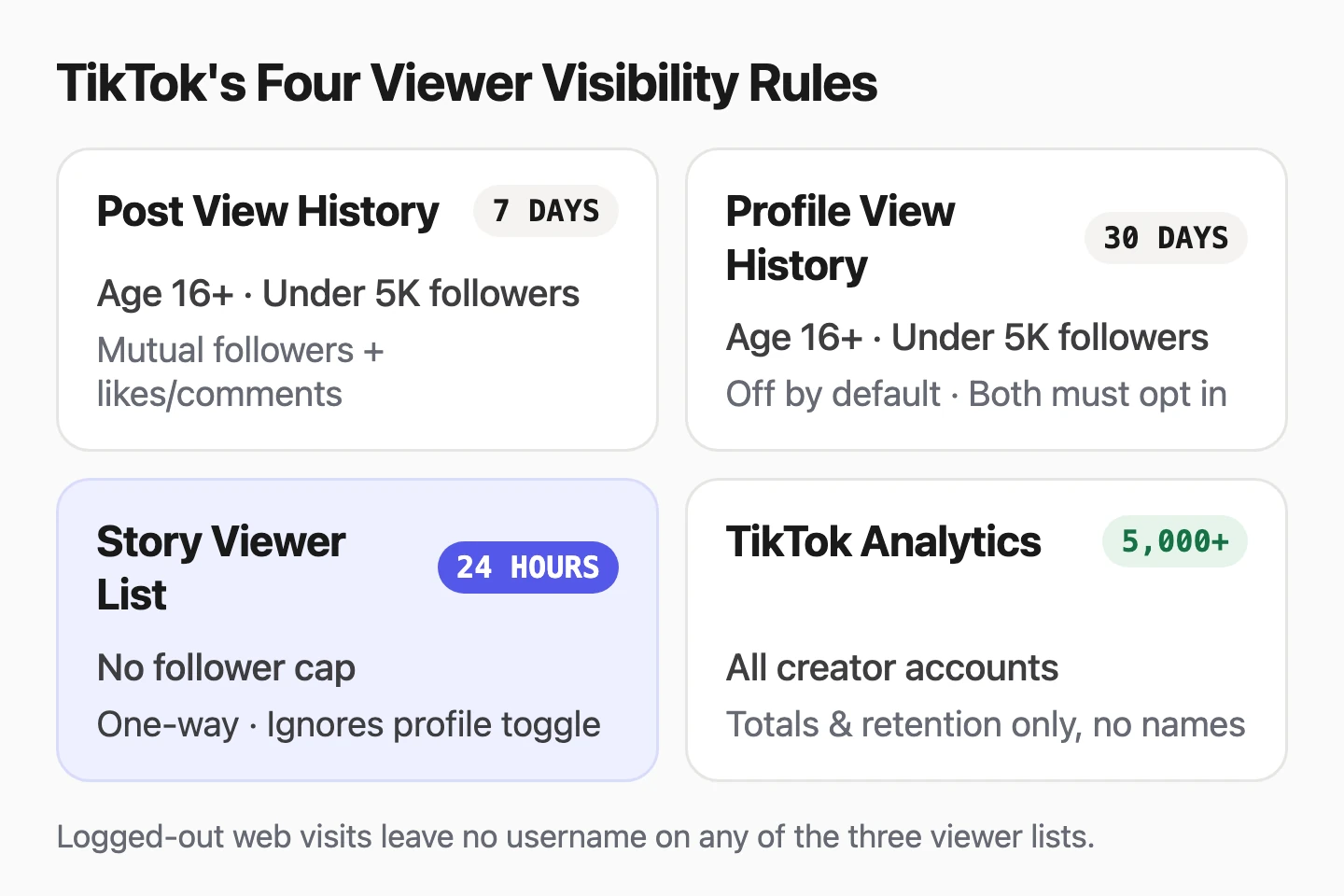
Post View History tracks recent video views, Profile View History logs profile page visits, and the Story viewer list captures every signed-in Story viewer. Past 5,000 followers, TikTok removes both post and profile visitor lists in favor of TikTok Studio analytics.
| Rule | Post View History | Profile View History | Story Viewers | TikTok Analytics |
|---|---|---|---|---|
| Surface | Recent videos | Profile page | 24-hour Stories | All public posts |
| Window | 7 days from upload | Past 30 days | 24 hours (then archive) | 7–365 days |
| Eligibility | 16+, under 5,000 followers | 16+, under 5,000 followers | Any Story poster | Any creator account |
| Mutual opt-in | Yes for followers (plus non-followers who like or comment) | Yes, both accounts must enable | No, one-way visibility | No usernames shown |
| Logged-out web | Hidden | Hidden | Hidden | Totals only |
Post and profile lists are strict mutual toggles capped at 5,000 followers. Stories work differently: any signed-in user who opens your Story appears on your list automatically.
Does TikTok Show Who Viewed Your Video? (Post View History Rules)
Yes, TikTok reveals a partial list of viewers on recent videos if you qualify and turn on Post View History. When users ask does TikTok show who viewed your video, they often expect every person reflected in the play counter. In practice, TikTok hides casual viewers by default.
To access Post View History, you must be at least 16 years old and have fewer than 5,000 followers. The list applies only to videos published within the last 7 days. After seven days, TikTok removes the individual viewer roster permanently while keeping total views, likes, and comments.
So can TikTok users see who viewed their videos in full? No. Only two groups appear on a 7-day video viewer list:
- Followers with Post View History enabled who watched the video within 7 days.
- Non-followers who liked or commented, even if they left the setting off.
Anyone who watches silently from the For You feed without following or interacting never reveals their handle. Followers who disable the toggle stay invisible too.
How to See Who Viewed Your TikTok Video
Eligible accounts can enable video viewer lists in seconds inside the mobile app. Follow these steps for how to see who viewed your TikTok video on posts from the past week.
Open Privacy settings. Tap Profile, open the top-right Menu icon, choose Settings and privacy, then tap Privacy.
Enable Post views. Tap Post views (or Viewers on some builds) and switch Post view history on.
Open a video under 7 days old. Return to your profile grid and play any video published within the past week.
Tap the bottom-left Views count. Select the Views indicator to inspect eligible followers alongside non-followers who liked or commented.
Turning this on is reciprocal: accounts you follow who also keep Post View History on can see when you watch their eligible videos during the first 7 days.
Does TikTok Show Who Viewed Your Profile? (30-Day Profile Views)
Yes, TikTok logs profile visitors from the past 30 days when both accounts enable Profile View History. If you wonder does TikTok show who viewed your profile automatically, it does not: TikTok profile views tracking starts switched off on every account.
Profile View History enforces the same rules as Post View History—age 16+ and under 5,000 followers—plus strict two-way opt-in. Visitors who keep the setting off, or open your profile while logged out in a browser, never appear on the list.
TikTok also lists each visitor only once per 30-day window. It does not reveal exact visit timestamps or tell you whether someone checked your profile once or ten times.
How to See Profile Views on TikTok
TikTok puts the Profile views toggle in three app menus. Here is how to see profile views on TikTok quickly.
Tap the footsteps icon on Profile. Go to your Profile tab and tap the footsteps (or eye) icon near the top right corner.
Toggle Profile view history on. Tap Turn on at the prompt, or tap the Settings gear inside Profile views to enable it.
Manage via Settings or Inbox. You can also switch it under Settings and privacy > Privacy > Profile views, or open updates from Inbox > Activities.
Missing the footsteps icon usually means one of three things: your account has 5,000 or more followers, your registered age is under 16, or your app version is outdated.
TikTok Story Views: The One Complete Viewer List
Stories ignore both Post View History and Profile View History. When you post a 24-hour Story, TikTok logs every signed-in account that watches it inside your Story viewer list, with no 5,000-follower cutoff and no mutual opt-in requirement.
That creates TikTok's biggest privacy trap: disabling profile views does not make you anonymous on Stories. If you are logged into TikTok and tap a creator's ring to open an active Story, your username appears on their viewer list for 24 hours and stays stored in their private archive afterward.
To check who watched your Story, open it from your avatar and tap Views in the bottom-left corner. To inspect a public creator's active 24-hour clips without signing into TikTok or landing on their Story viewer list, use TokToolset's TikTok Story Viewer, which displays active public Stories and their remaining hours before expiry.
How Does TikTok Viewer History Work When You Turn It Off?
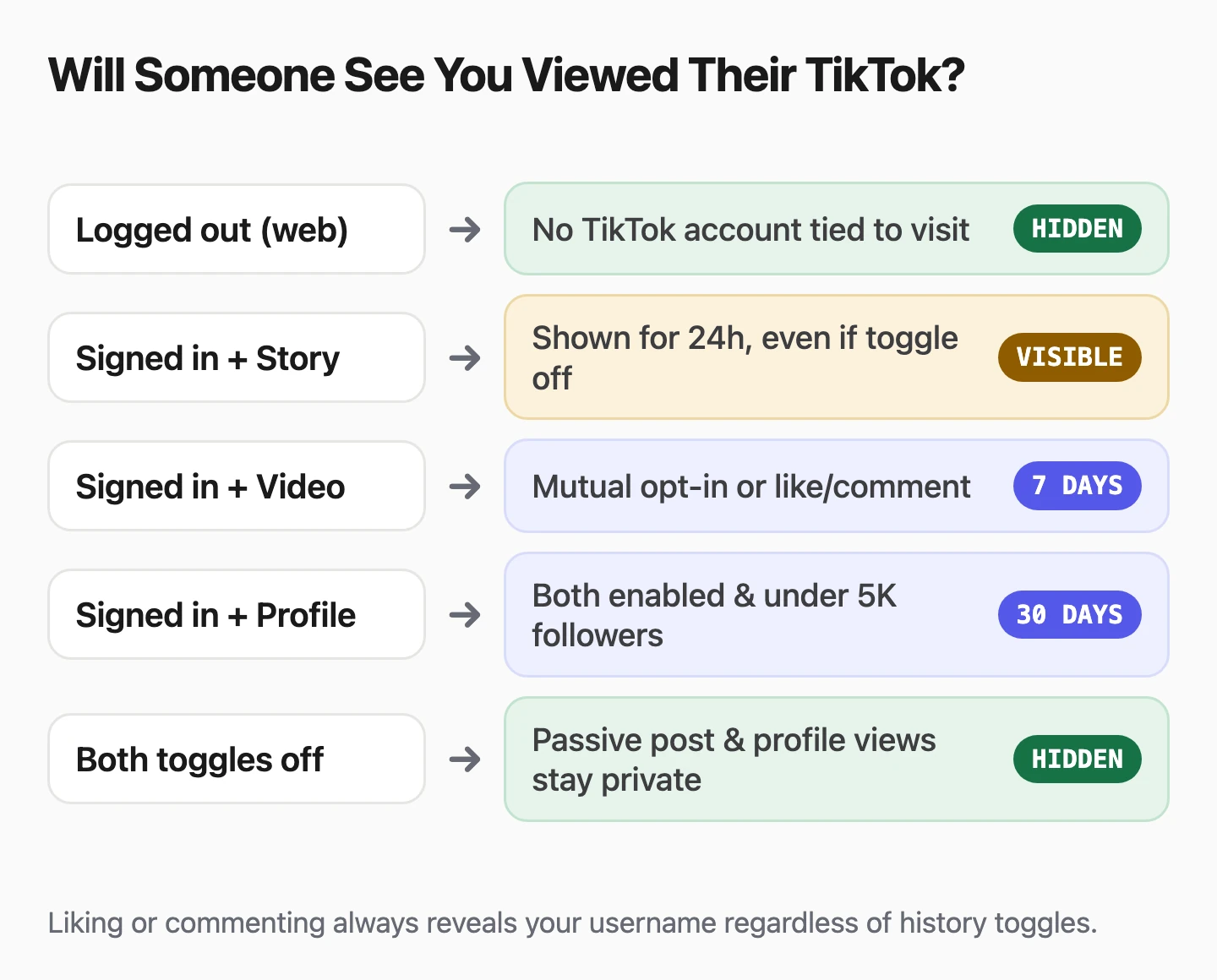
Knowing how does TikTok viewer history work protects your own browsing privacy. Users frequently ask can people see what you watch on TikTok out of concern that casual scrolling sends alerts. The rule is straightforward: disabling viewer history hides passive views, while likes, comments, and Story opens still show your handle.
Because TikTok viewer history uses two separate switches (Profile views and Post views), turning off only one leaves the other active. Disable both if you want quiet browsing while signed in.
How to Turn Off Viewer History on TikTok
Here is where the viewer history setting lives and how to turn off viewer history on TikTok across both toggles.
Navigate to Privacy. Open Profile > Menu > Settings and privacy > Privacy.
Disable Profile views. Open Profile views and toggle Profile view history off to stop logging 30-day profile visits.
Disable Post views. Go back to Privacy, open Post views (or Viewers), and toggle Post view history off.
Turning Profile views off after visiting someone removes your name from their live 30-day list going forward. However, if they already opened their visitor list or received an Inbox notification before you switched it off, disabling it afterward cannot undo what they already saw.
Desktop Web, Logged-Out Browsing, and Private Accounts
Several high-impact scenarios happen outside the standard mobile toggle:
- Desktop web on PC or Mac: TikTok's website hides the mobile Profile views menu, yet browsing while signed into your TikTok account on a computer still links activity to your account settings. Hovering over a thumbnail without opening a profile does not log a profile view, though opening a profile or playing an eligible video while signed in follows your active toggles.
- Logged-out browsing: Without a signed-in TikTok session, TikTok has no username to record. Viewing public profiles, videos, or Stories while logged out leaves zero identity on any list.
- Private accounts: Setting your account to Private controls who follows you, not whether others see your visits. You still need both history toggles off—and signed-in Story views remain visible.
- Likes, comments, and shared links: Liking or commenting always notifies the creator. Sharing links straight from the app can also prompt TikTok to suggest your account to recipients unless you turn off link-sharing suggestions in Privacy.
For routine public research on desktop or mobile without login pop-ups or accidental footprints, browsing through an anonymous TikTok viewer keeps every lookup separate from personal TikTok accounts. You can also inspect public bios, follower totals, and posted grids directly in the TikTok Account Viewer.
Why Your Viewer List Looks Empty — And What Creators Over 5,000 Followers See
A fresh post with 2,000 total views showing only three names is expected. Every play passes through three filters before reaching your Post View History list: non-followers who did not interact drop out, followers with Post View History off stay hidden, and posts older than 7 days lose viewer lists completely.
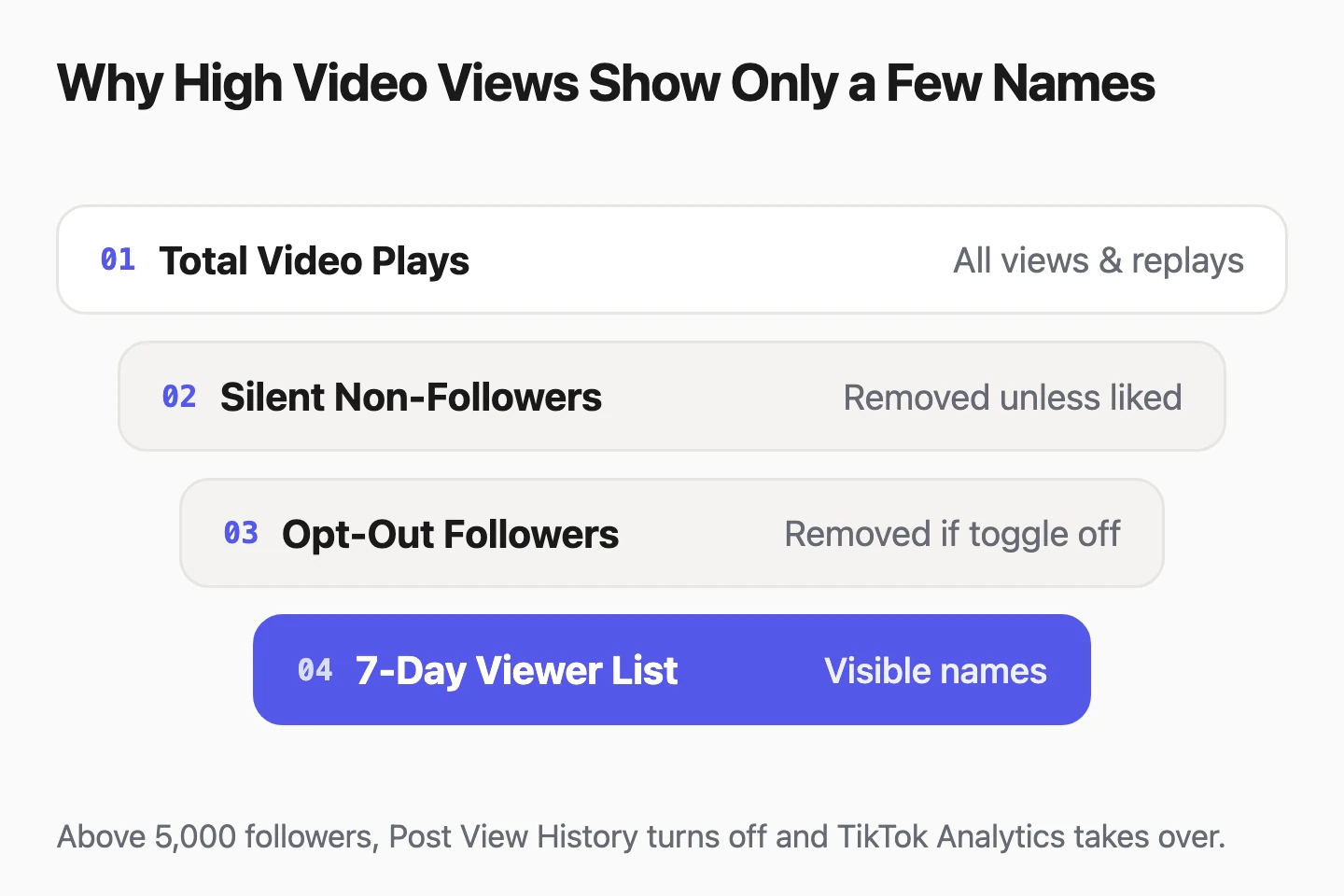
Once you hit 5,000 followers, the focus moves past can you see who views your TikToks individually toward audience-level performance. So can creators see who views their TikToks above 5,000 followers? No—TikTok disables both Post View History and Profile View History at that threshold.
Instead, open TikTok Studio (Menu > TikTok Studio > Analytics) or tap More insights on a post to read aggregated metrics:
- Retention and watch time: Track exact drop-off seconds and full-video completion rates.
- Traffic sources: See shares from For You, Search, Following, Sounds, and Profile visits.
- Audience demographics: Review aggregated locations, age brackets, gender splits, and peak active hours.
- Public feedback: Audit likes, reposts, and comment threads—or export larger public discussions cleanly using the TikTok Comment Viewer and our TikTok public research workflow.
Frequently Asked Questions
Can you see who views your TikToks if they don't follow you?
Usually no. Under Post View History, non-followers only appear on your 7-day video viewer list if they actively like or comment on your post. A non-follower who simply watches your video on the For You feed without interacting adds to your total view count but never reveals their username.
Can people see you viewed their TikTok Story if your profile views are off?
Yes. TikTok Stories use a separate viewer list that ignores both Profile View History and Post View History toggles. If you are logged into your TikTok account and watch someone's Story in the app, your username appears on their Story viewer list for 24 hours even with profile views disabled.
Does TikTok notify you when someone views your profile or video?
TikTok sends occasional Inbox activity notifications summarizing new profile views only when both you and the visitor have Profile View History turned on and your account has fewer than 5,000 followers. TikTok does not send individual push notifications every time someone simply watches your regular video without liking or commenting.
Can you see how many times someone viewed your TikTok profile or video?
No. Even when Post View History or Profile View History is active, TikTok only shows each eligible account once on the list. It never displays an exact repeat-visit counter, watch duration per individual user, or the specific timestamps showing how many times one person returned to your page.
If you are not logged into TikTok, can someone see you viewed their profile?
No. TikTok can only record a profile visit or Story view when a signed-in account performs the action. If you view a public profile or video in a web browser while completely logged out—or through a web viewer that requires no TikTok login—your visit leaves zero name on any viewer list.
Can you see who is viewing your TikTok account if your account is private?
Yes, under the same rules as public accounts. If your private account has fewer than 5,000 followers, you are 16 or older, and both you and an approved follower enable Profile View History or Post View History, you will see eligible views from your followers within the 30-day or 7-day windows.
Still wondering can you see who views your TikToks while researching public profiles, Stories, or niche trends? Use TokToolset's homepage to browse public TikTok accounts, active 24-hour Stories, reposts, follower lists, videos, and comments without a TikTok login and without entering any viewer history. New accounts include 10 welcome credits for non-AI tools, lookups start at 1 credit, and failed or restricted private-account requests refund automatically.